

When a Shopify brand starts selling to wholesale or trade buyers, the typical next step is a second system: a separate B2B store, a Plus upgrade, or a bolt-on app that runs its own parallel catalog. That’s real infrastructure to build and maintain, and for a lot of brands it’s more than the job requires.
Underneath, wholesale is mostly an access problem. Some buyers should see trade pricing and trade-only products, and everyone else shouldn’t. Framed that way, a membership handles basic wholesale needs: use the same store, gated for the accounts you approve.
Wholesale isn’t a separate store. It’s a different level of access to the one you have.
Wholesale ecommerce is an access problem
A wholesale program comes down to a few rules: approved buyers pay trade prices, some products are trade-only, and certain shipping options (freight, pallet, expedited) belong to those buyers. None of that set up requires a different storefront — it only needs a way to say, “this customer is trade, and trade unlocks these things.”
That’s what a membership plan is: a definition of who qualifies and what they get. Make wholesale a membership plan, attach the pricing and access rules as perks, and your existing store becomes a B2B channel for the members on it.
What a membership-based wholesale channel looks like
A buyer applies or is invited, you approve them onto the wholesale plan, and from then on they see member pricing at checkout, can buy the trade-only products, and get the shipping rates you’ve reserved for trade.
Zendra makes it simple to add a membership from the Customer profile in your Shopify admin: click “Add membership”, choose the plan, and your member immediately gains access to their perks.
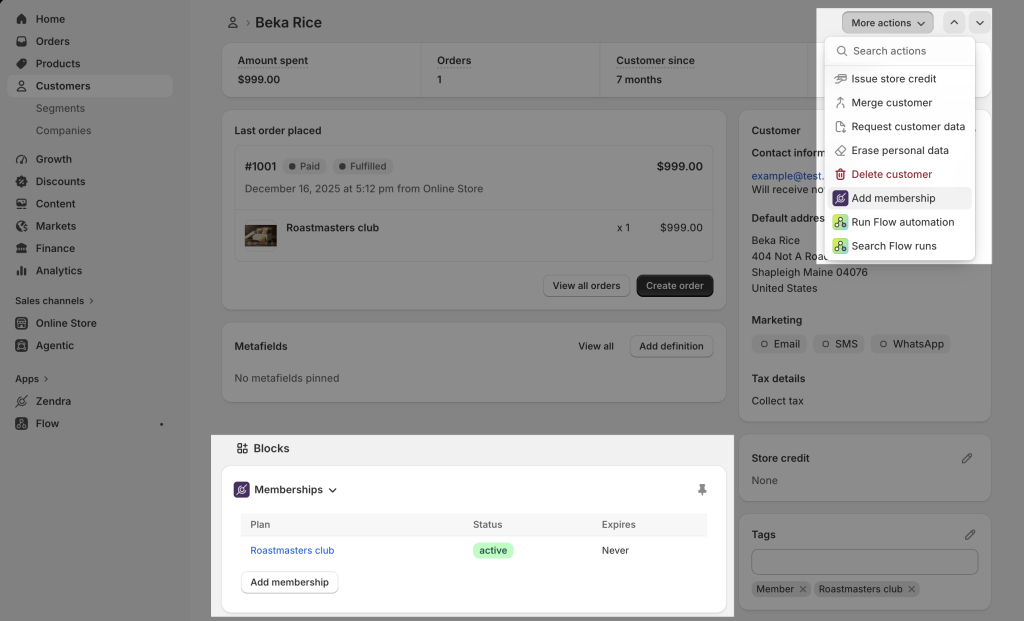
Retail customers browsing the same store see none of the wholesale perks or pricing. You only maintain one catalog, one checkout, and one customer list — the membership is the layer that changes what each account can do.
This set up is lightweight when you start offering wholesale to test the waters. It’s easy to create, and uses the existing listings and inventory you already have, reducing the overhead to launch your trade program. As it grows, you may need to create dedicated inventory or invoicing rules, but you can get started in minutes with simple access controls. The general version of that sequence is in our guide to starting a membership program.
Gating wholesale pricing
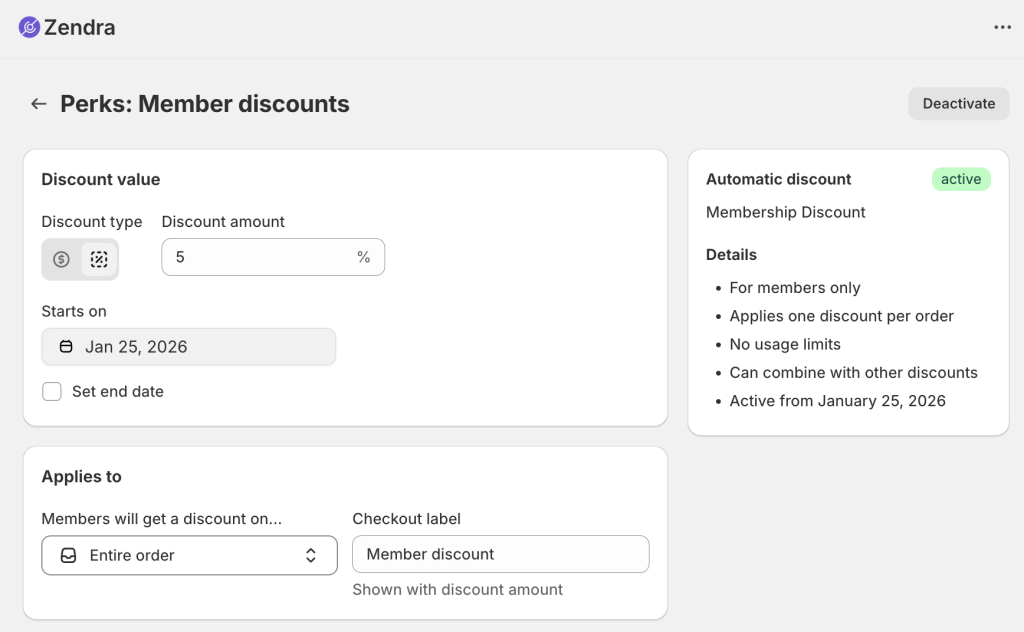
Pricing is the core of any wholesale ecommerce program, and Zendra applies it automatically. You can set a member discount on a buyer’s entire order, or apply special member pricing to specific products and collections — useful when only part of your catalog is sold at trade rates.
The discount is calculated at checkout for active members, so there’s no separate price list to maintain or coupon to hand out. (See member discounts for the configuration details.)
Controlling who can buy
Pricing is half the job; the other half is controlling visibility and eligibility, and Zendra gives you a few levers:
- Members-only products hide trade SKUs from non-members entirely, so a wholesale-only line won’t show details to non-members on the storefront.
- Purchase restrictions keep a product visible to everyone but allow only active members to buy it — validated when the item is added to the cart and again at checkout, so a retail shopper can’t slip a case-pack order through.
- Members-only shipping rates reserve specific options — like freight, pallet, or expedited — so only approved trade accounts can select them.
Together these let you decide, product by product, whether something is hidden, look-but-don’t-buy, or fully open — without splitting your catalog across two stores.
Approving wholesale members
Wholesale almost always needs a gate: you want to vet a business before it gets trade pricing. Zendra grants and tracks the access; the vetting is your process, and there are two ways we’ve seen merchants handle this.
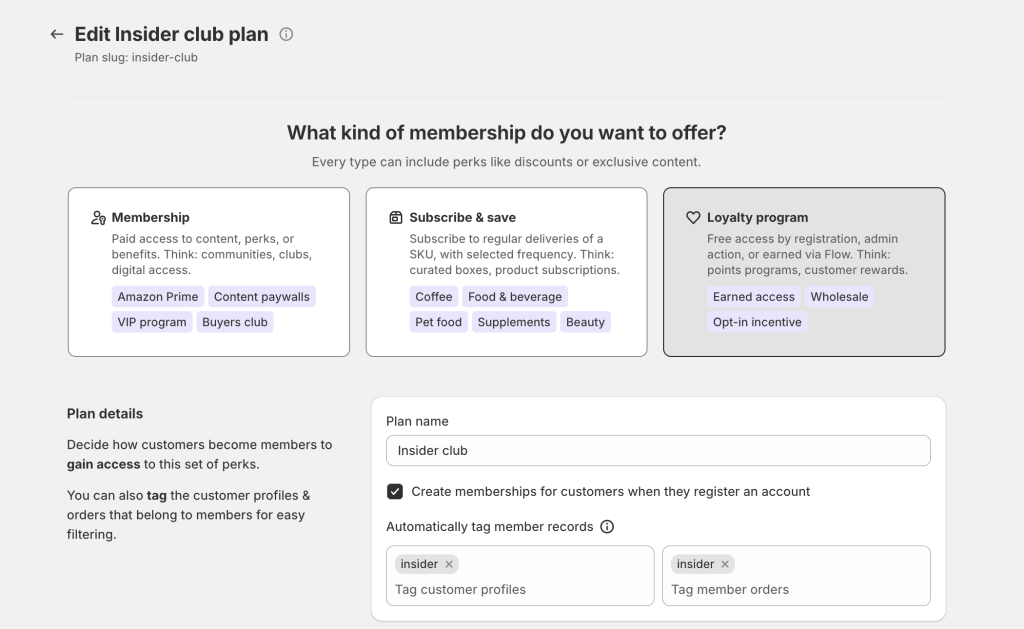
- You can grant a complimentary membership to an approved customer directly from their Shopify customer page — no purchase required — which fits a flow where buyers email or fill out a form, you check them, and you flip them to wholesale by hand.
- Or you can let buyers self-serve onto a free wholesale plan at signup and review them after the fact.
Either way, Zendra tags approved members automatically, so you can segment, report, and build further automation around the “wholesale” tag in Shopify.
Automating it with Shopify Flow
Once the structure is in place, Flow removes the manual steps. Zendra’s Create membership action can grant the wholesale plan when a condition is met — for example, when a customer’s lifetime spend crosses a threshold you set — so a high-volume buyer graduates into trade pricing without anyone watching the account. That’s an earned membership in a B2B wrapper.

Combined with automatic tagging, you get Shopify-native segments and reporting that stay current on their own.
Our milestone rewards post walks through building these Flow workflows.
When native Shopify B2B is the better tool
This model fits brands that want a trade channel without standing up separate infrastructure. It has a real ceiling, though: if you need company accounts with multiple buyers under one business, customer-specific catalogs and price lists at scale, net payment terms, or purchase-order workflows, Shopify’s native B2B (on Plus) is built for exactly that and will serve you better.
A membership-based wholesale channel is the right call when your needs are gated pricing, trade-only products, and controlled shipping — not a full procurement system. Oftentimes, memberships are a great way to test a wholesale ecommerce program, since they fit into your existing store easily, and use Shopify-native features like customer accounts. You’ll have a clean migration path to Shopify B2B features later.
Where to start
Create a wholesale plan, attach your pricing and access perks, and decide how buyers get approved onto it. You can start with manual grants and add Flow automation once the volume justifies it.
Our content and product gating docs cover the access rules in detail, or you can add Zendra to your store and build the plan on a free tier first.





Leave a Reply