

A membership program can look deceptively simple: choose an app, set a price, lock a few products or pieces of content, and publish.
That covers the mechanics, but it doesn’t necessarily create a program people value. A real membership makes a clearer promise: these are the people this store is built around, and this is what they receive for belonging. Once you understand that promise, configuring the software is usually the easy part.
This guide takes you from a blank membership plan to a live Shopify program. You will decide who belongs, how members join and pay, which perks support the behavior you want, what deserves to be gated, and how to launch without manually maintaining customer or product tags.
Choose the membership model you want to build
“Membership” describes several different business models. The right one depends on who should belong, what they value, and what you want the program to accomplish.
- Free perks club: Customers join by creating an account, making a purchase, or reaching a milestone. Members might receive special pricing, free shipping, or early access without paying a fee. This is often the lowest-risk way to learn whether membership changes customer behavior.
- Paid VIP tier: A recurring or one-time fee unlocks exclusive discounts, products, services, or content. The fee itself can filter for intent, but the program still needs benefits worth paying for.
- Subscription-backed membership: The customer pays for membership on a recurring schedule, such as monthly or annually. Unlike a product subscription, the central value is ongoing status, access, or perks rather than a recurring shipment.
- Wholesale or B2B club: Approved buyers unlock trade pricing, restricted products, or ordering privileges. Our B2B membership guide covers this model in more detail.
- Creator or community membership: Members join for access to a Discord server, gated articles, private events, or the experience of being closer to the creator. The creator membership guide explains how this model works on Shopify.
- Gated digital access: Members receive access to courses, downloads, research, templates, or a growing content library.
You don’t have to choose one model forever! Many stores start with a free program to learn what customers value, then add a paid tier once the benefits are proven.
If you sell a product subscription, you can still turn this into a membership: layer in perks alongside recurring deliveries, to consistently deliver value between packages, and keep subscribers engaged while they wait for new items.
Understand why membership changes behavior
The strongest programs do more than issue discounts; they give people a reason to see themselves as insiders.
A membership works when it changes how customers think about their relationship with a brand. The strongest programs do more than issue discounts; they give people a reason to see themselves as insiders.
McKinsey’s research on paid loyalty found that customers who join paid programs are more likely to purchase frequently and choose the brand over competitors. Part of that behavior comes from wanting to justify the fee, but the effect is broader than sunk cost. Once someone thinks of themselves as “a member here,” buying elsewhere can feel like giving up access, progress, or status.
That’s the durable version of loyalty. It leads to the question behind every decision in this guide: does this make membership feel like belonging, or does it simply issue another coupon?
Our article on building a membership that offers more than discounts explores the strategy in depth.
Make 3 decisions before you start
You need an active Shopify store and Zendra installed. The free plan supports up to 75 active members, which is enough to build and launch a real program before committing to a paid app plan.
Before opening the plan editor, answer three questions.
- Who should belong? Decide whether membership is for every customer or a more specific group, such as repeat buyers, wholesale accounts, subscribers, or community members. A narrower audience often produces a clearer program.
- What is belonging worth? List what members receive that non-members do not. A modest discount can be part of the answer, but it shouldn’t be the entire answer unless price is genuinely the program’s central value.
- Should membership be free or paid? Free programs remove friction and grow quickly; paid programs filter for intent and can create predictable revenue. Many merchants use both, with a free base tier and a paid tier above it.
These decisions define the program. The remaining work is translating them into membership rules, billing, perks, and access.
Step 1: Choose how customers become members
Every Zendra program begins with a membership plan. The plan defines how a customer becomes a member, what they receive, and how long their access lasts.
Choose the entry method that matches the audience you identified.
- Purchase or subscription: The customer buys a membership product with a one-time or recurring price. Their membership activates when the order is placed.
- Account signup: Customers become members when they create a Shopify account. This works well for a free perks club.
- Merchant invite: You grant membership from the customer’s Shopify profile without requiring a purchase. Use this for complimentary VIP access, approved wholesale buyers, influencers, or customer-service exceptions.
(Start with a “Loyalty program”, but don’t give access on registration. You can add it manually later.) - Shopify Flow condition: A Flow automation creates the membership after a qualifying event, such as a customer reaching $500 in lifetime spend.
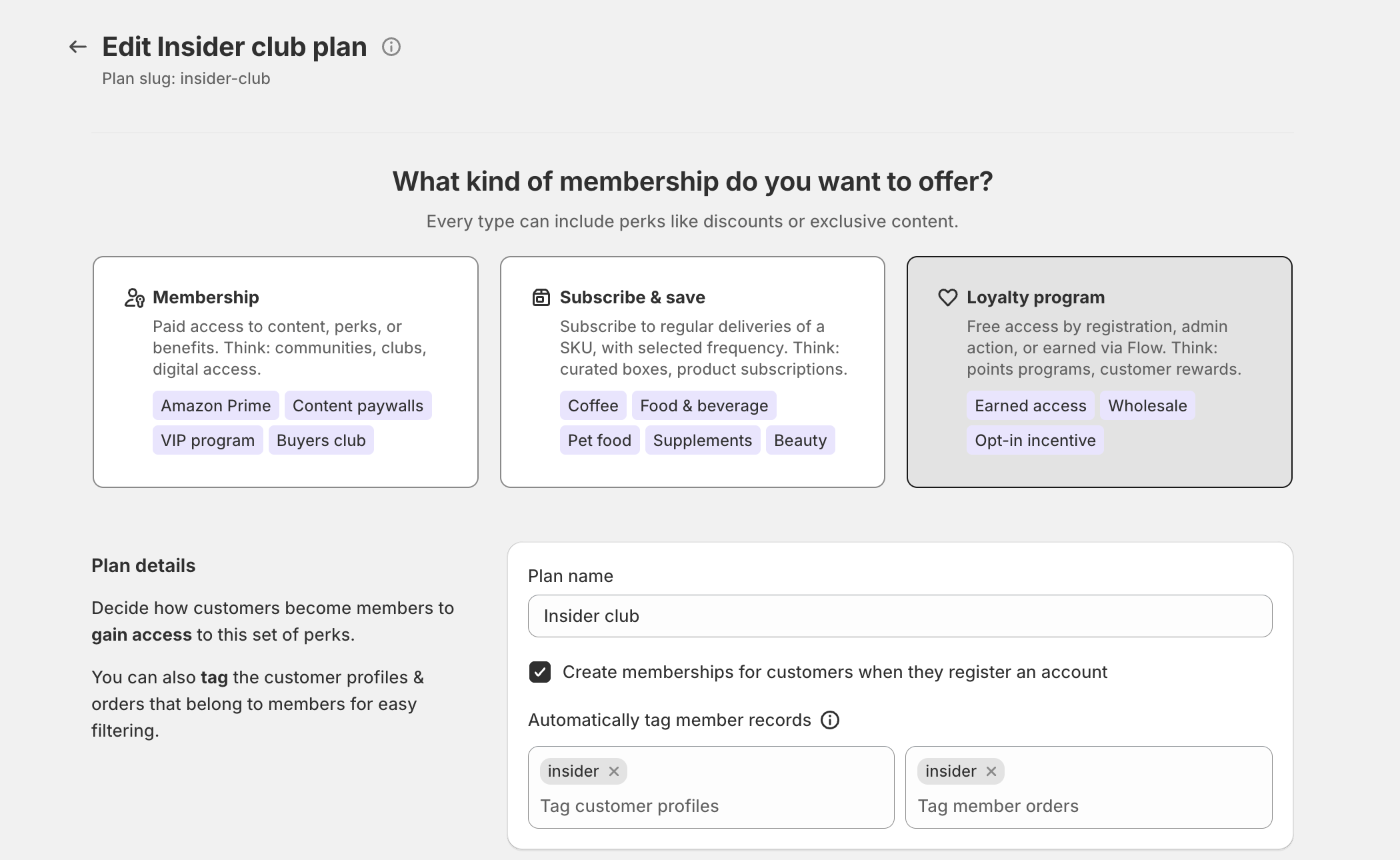
A free customer club might use account signup, while a wholesale program might rely on merchant invites after an approval process. A VIP program could combine a free entry tier with a separate paid plan. The membership plan triggers documentation explains each option in detail.
Step 2: Decide how members pay
Next, choose whether membership is free, purchased once, or billed on a recurring schedule.
- Free: The plan grants perks or access without charging the customer.
- One-time payment: A single purchase grants a fixed-term or open-ended membership. This works well for lifetime clubs, annual passes sold upfront, and seasonal access.
- Subscription: The customer pays on a weekly, monthly, annual, or custom cadence. Higher Zendra plans can also set minimum commitments or maximum billing cycles.
Paid plans can also use two additional pricing tools on Zendra’s Starter plan and above.
- Free trials: The trial has its own duration, independent of the billing interval. A monthly membership can therefore offer a 14-day trial instead of forcing the trial to last a full month. Our article on choosing a membership trial length provides a deep dive.
- Signup fees: A one-time enrollment charge sits alongside the recurring price. It can cover onboarding costs, increase perceived commitment, or filter for customers with stronger intent.

If you’re uncertain about demand, begin with a free or one-time payment plan. You can add a subscription tier later without rebuilding the rest of the program. (Our recurring billing documentation covers the available settings.)
Step 3: Design perks around the behavior you want
Perks determine whether your program feels like membership or is just a standing promotion.
Discounts are useful because customers understand them immediately. Zendra can apply order-level or product-level member discounts automatically at checkout, without requiring a code. Discounts are also easy for competitors to copy, so the strongest programs usually combine price benefits with access, convenience, or recognition.
- Automatic member discounts: Apply a percentage or fixed amount to the order, or offer special pricing on selected products. You can prevent product discounts from stacking on products that are already on sale.
- Free or discounted shipping: Remove shipping charges, reduce rates, or create members-only shipping options. Member free shipping is available on every Zendra plan; shipping discounts and exclusive rates are available on Starter and above.
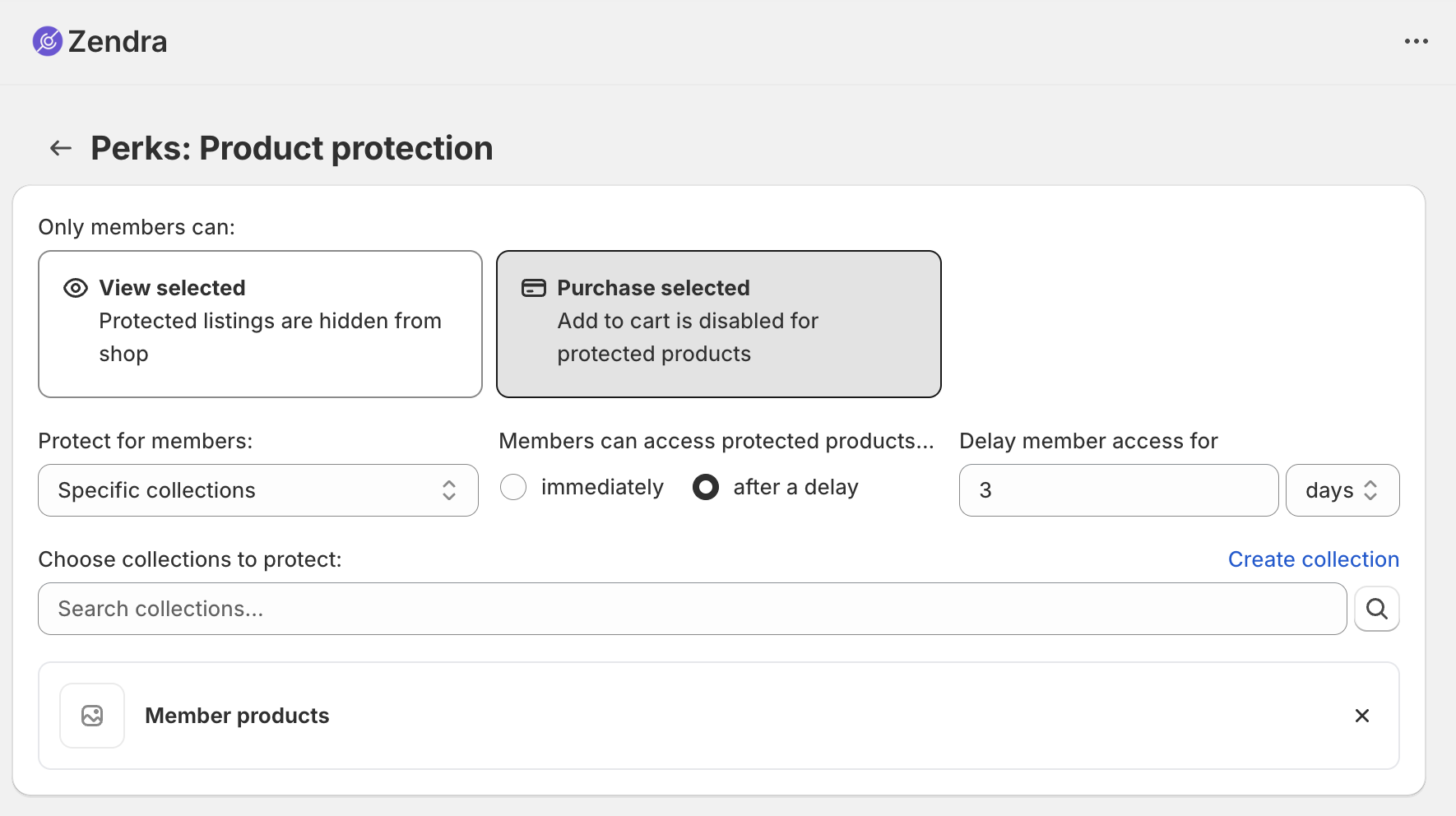
- Members-only products: Hide selected products from non-members so limited releases, event tickets, professional equipment, or special bundles are reserved for the program. This perk is available on Starter and above.
- Exclusive or early access: Give members the first opportunity to buy products, browse collections, or read content.
- Scheduled perks: Set start and end dates for a perk, allowing a members’ sale or early-access window to open and close automatically.
Use discounts when you need a clear, immediate reason to join. Use access when you want members to return, anticipate what comes next, and feel that the program gives them something unavailable elsewhere. The comparison becomes more useful when the two work together: price makes the value legible, while access makes it distinctive.
Our articles on member discounts versus access and milestone rewards explore those tradeoffs in more detail.
Step 4: Gate only what members should value
Gating turns an advertised benefit into real exclusivity. Zendra can restrict content, products, and access over time.
- Content: Restrict blog articles, pages, or product details to active members. Non-members can see a teaser and a prompt to join, with the call to action leading to the Memberships collection Zendra creates automatically.
- Products: Hide products from non-members entirely, or leave them visible while preventing non-members from purchasing. Purchase restrictions are enforced through cart and checkout validation.
- Access over time: On the Growth plan, content and perks can unlock on a schedule based on each member’s join date. This works well for courses, onboarding programs, and benefit sequences that should unfold gradually.
Gate the parts of the experience that make membership worth joining, but leave enough open for prospective customers to understand the value. A store that hides everything can feel closed rather than exclusive.
For programs built around downloads or a digital library, Fileflare can deliver the files members receive. Digital resources often have low marginal cost and high perceived value, which makes them useful additions to a broader membership program. The gated content guide and member content protection documentation explain the available approaches.
Step 5: Launch the program
Once the plan, billing, perks, and access rules are ready, launching is mostly a matter of connecting the storefront experience.
- Add the purchase widget: Place Zendra’s theme app block on the membership product page. It can show the billing options, benefits, and purchase controls without custom Liquid. You write the benefit copy and can offer a one-time purchase alongside the subscription when appropriate.
- Enable the customer portal: Members manage their status, upcoming charges, billing history, payment method, perks, and cancellations through Shopify’s customer account area. Turn on the Zendra app embed so the membership interface appears.
- Use the segments and tags Zendra creates: Zendra maintains a Memberships smart collection, creates customer segments for active members and individual plans, and tags members and their orders automatically. These records can support email targeting, Shopify Flow automations, discounts, and other connected apps.
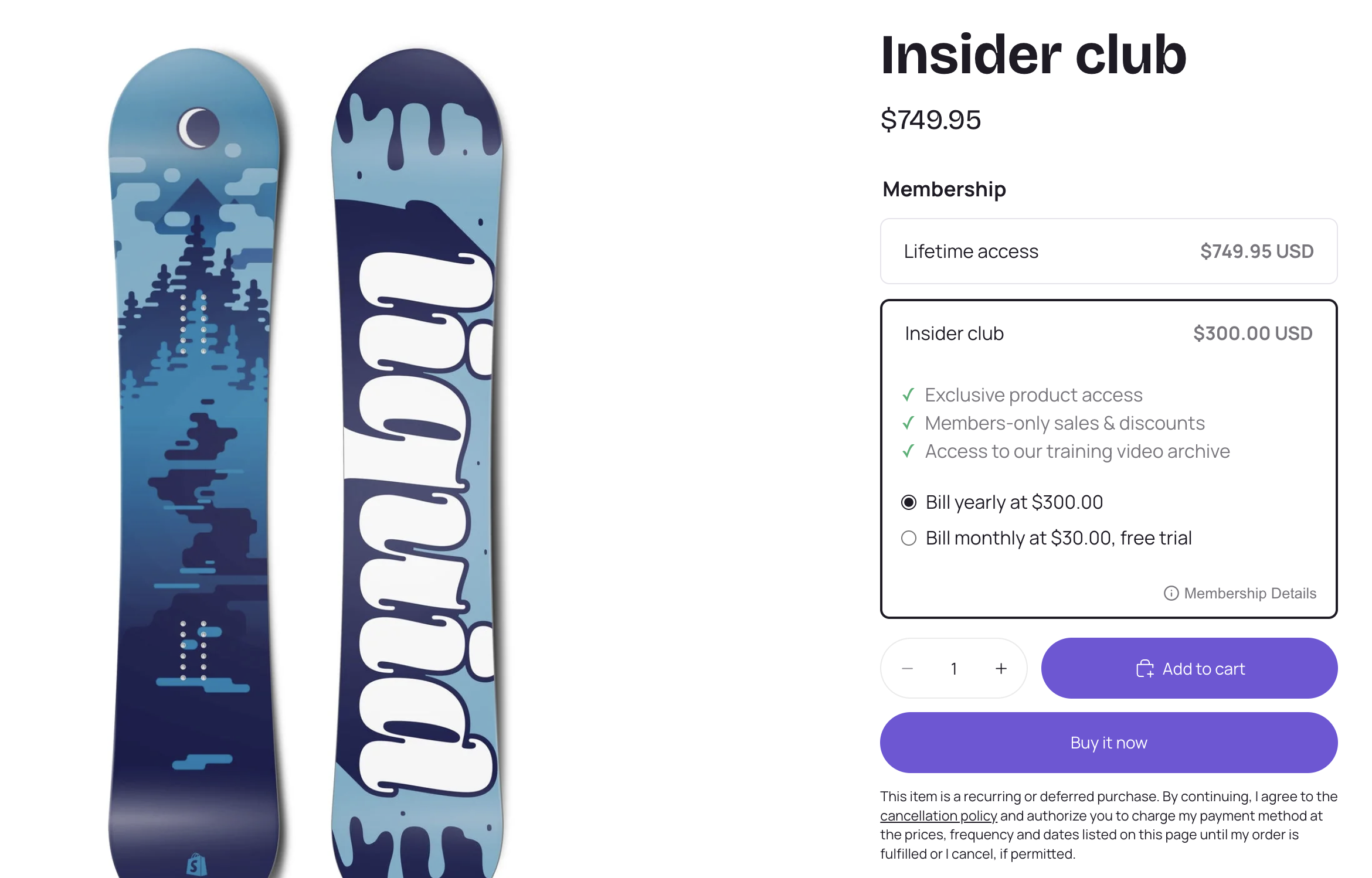
At that point, customers can join, pay, receive their perks, and manage their membership. The first-membership launch guide provides a more detailed checklist.
Plan for the membership lifecycle
Launching the program is only the beginning. The long-term value comes from handling renewals, payment failures, cancellations, and member communication consistently.
- Renewals and reminders: Subscriptions renew automatically, and members can receive an email before each charge.
- Failed payments: When a charge fails, Zendra pauses the subscription, notifies the customer, and retries the payment. If a later attempt succeeds, the subscription and membership reactivate automatically.
- Expiring memberships: Memberships approaching their end date can be identified before the member lapses, giving you time to communicate or offer a renewal path.
- Cancellations: A customer who cancels can retain access through the period already paid for instead of losing benefits immediately.
- Refund and payment synchronization: If the order that granted membership is refunded or canceled, Zendra can end the membership so access continues to match payment status.
Zendra includes customizable lifecycle emails for activation, renewal, upcoming renewals, payment failures, cancellation, expiry, ending-soon notices, and re-subscription. You can control the message and timing for each notification. Shopify Flow can support more specialized automations, such as issuing store credit after a member reaches a milestone. Our membership lifecycle and email notification documentation cover these options.
Two optional integrations can extend membership beyond the storefront.
- On Growth and above, the Discord integration can assign roles based on membership plan and let members connect their accounts.
- The Shopify POS extension shows membership information in person, so staff can recognize members at the counter.
Neither integration is required, but both reinforce the same principle: membership should be visible wherever customers interact with the brand. Our Shopify POS membership guide shows how the in-person experience works.
Move up when the program needs more
Zendra meters plans by active member count, not storage or membership revenue. Canceled and expired memberships no longer count toward the limit, so pricing follows the number of customers currently receiving value.
The free plan supports up to 75 active members and includes unlimited plans and tiers, membership triggers, recurring billing, automatic member discounts, free shipping, content gating, Shopify Flow, the customer portal, automatic tagging, and member reporting. For many merchants, it is enough to launch and validate the program.
Upgrade when you need a higher member limit or a capability tied to a paid plan.
- Starter ($19 per month): Removes Zendra branding and adds members-only products, gift memberships, free trials, signup fees, shipping discounts, and members-only shipping rates.
- Growth ($39 per month): Adds Discord, content and access dripping, minimum and maximum billing cycles, and the advanced member portal.
- Business ($79 per month): Adds metaobject protection, members-only storefront templates, and dedicated support.
- Plus ($199 or more per month): Supports higher member counts, faster support service levels, and API access.
The complete comparison is available on the Zendra pricing page. Zendra also warns you as the program approaches its active-member limit, allowing you to upgrade before the cap affects new memberships.
A recap: Shopify membership app setup
Choose free or paid based on the job
A free and a paid membership solve different problems. Free membership removes friction, grows the audience, and gives you room to test which perks influence behavior. Paid membership filters for intent and can produce predictable recurring revenue. Many stores combine them, using a free base tier and a paid VIP tier.
Separate membership status from subscription billing
A subscription is a billing arrangement: the customer is charged on a recurring schedule.
A membership is a status: the customer belongs and receives defined benefits. The two overlap when a subscription pays for membership, but membership can also be free, purchased once, granted manually, or triggered by customer behavior.
Apply perks without maintaining product tags
You configure the plan and its perks in Zendra, then apply the relevant products, content, discounts, or access rules. You do not need to maintain a separate customer tag or manually tag every product and page simply to keep the membership working.
Decide whether non-members can see exclusive products
Members-only products are hidden from non-members. Purchase restrictions take the opposite approach: anyone can view the product, but only eligible members can add it to the cart and complete checkout. Hide products when discovery itself is part of the exclusivity; leave them visible when the product should serve as a reason to join.
Let Zendra handle common payment failures
When a recurring charge fails, Zendra pauses the subscription, emails the customer, and retries the payment. A successful retry reactivates the subscription and membership automatically, so the common case of an expired or replaced card does not require manual intervention.
Keep building from the foundation
A successful membership program begins with a clear audience and a reason to belong. The software should make that structure easier to operate, but it cannot decide what members should value. Start with the behavior you want to encourage, design benefits around it, and use the simplest plan that can deliver those benefits reliably.
These articles explore the next decisions in more depth:
- Why people join memberships: Understand the three motives behind joining before you design a single perk.
- Why your membership should be more than a discount: Build value through access, identity, and belonging rather than relying entirely on price.
- Launch your first membership: Follow the practical setup and launch checklist.
- Build exclusivity with gated content for members: Decide what to restrict and how to present it to prospective members.
- Build a B2B membership on Shopify: Create an approved-buyer program with trade pricing and restricted products.
- Connect Discord to your Shopify memberships: Add a community layer with membership-based roles.
- Price a membership when margins are low: Structure a paid tier without giving away the economics.
- Sell gift memberships: Let customers give access instead of a balance.
- Build a Nike-style membership: Make membership the default way to shop rather than a discount tier.
- Build an REI-style membership: Lead with belonging and let the financial reward support it.
- Build a Prime-style membership: Compete on removed friction instead of price.





Leave a Reply