

Gating content has a reputation for requiring heavy lift: a separate membership site, a second login, or a walled-off version of your store that members have to learn all over again. That reputation keeps Shopify brands from offering one of the cheapest, stickiest perks available — protected content.
Paywalls don’t have to work that way. You can keep the content inside the Shopify store you already run and protect it with a resource-based rule or, on Zendra’s Business plan and above, protect every resource assigned to a chosen theme template.
The hard part isn’t locking things down. It’s deciding what deserves to be locked, and how broad the rule should be.
We’ve already written about how you can control what members can buy — products, shipping, and discounts — so this article focuses on content visibility and access.
Gated content is a perk only if the rest of your store still does its job.
What is content gating?
Content gating restricts a piece of content to members whose active plan includes that perk. Some folks call it a paywall, paywalled content, or access control. The labels differ, but the visitor’s experience is the same: an eligible member sees the full resource, while everyone else sees a restriction message or teaser with a clear way to join.
The teaser matters! A hard wall tells a non-member nothing and gives them no reason to act. A useful preview shows what exists on the other side and turns protected content into a reason to become a member.

With Zendra, the join prompt points to your store’s automatically maintained Memberships collection, so someone who reaches a protected resource can move directly from interest to the plans that unlock it.
Keep the content that earns members public
Gating creates a real perk, but it carries a cost that’s easy to miss: content hidden from non-members can’t do the same acquisition work as an open article or landing page.
That gives us a practical rule:
Keep the content that earns members public. Gate the content that rewards them.
Your best search articles, explainers, and product education should usually stay open. They’re how a stranger learns that your expertise is worth paying for. The deeper resource library, premium guide, early research, or ongoing member series can sit behind the gate.
This is less about generosity than division of labor. Public content makes the case for the membership. Protected content fulfills it.
Choose the right kind of rule
Some access decisions follow the resource itself. Others follow the structure a team already uses to publish it. Zendra supports both approaches, along with bulk and filtered selectors for common groups of content.
Use resource-based rules when the content carries meaning
Choose resources directly when the decision depends on the content itself:
- A single premium article or an entire blog.
- A resource page that belongs to one plan.
- A product or collection whose details are part of the member experience.
- A published metaobject used as member content.
This is the right model when public and protected resources live beside one another and there isn’t a reliable structural difference between them. You can select a specific resource, use an all-content selector where supported, or group articles by author or tag and products by vendor or tag. Individual page, article, product, and collection protection is available on every Zendra plan; metaobject protection is available on Business and above.
Protect a theme template when the structure carries meaning
A Shopify theme template controls how a type of resource is laid out. Stores often create custom templates for recurring jobs: a premium editorial design, a member resource page, a private product detail, or a collection that should always carry the same presentation.
When the template already means, “This is member content,” the access rule can follow it. On the Business plan and above, Zendra can protect every resource using a selected:
- Article template
- Blog template
- Page template
- Product template
- Collection template
That includes your theme’s default template. If you choose the default page template, for example, every page assigned to that template falls inside the rule.
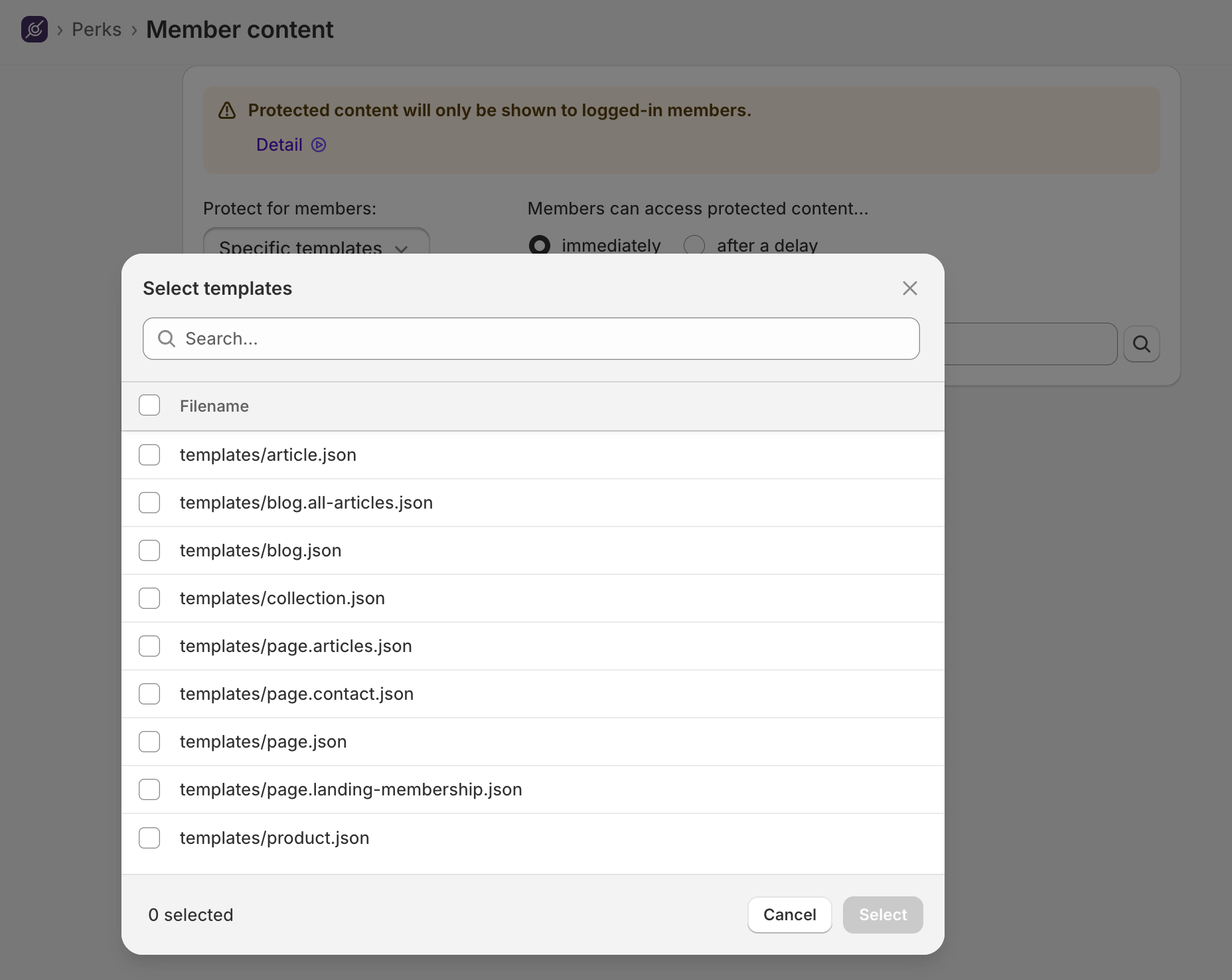
Template targeting is especially useful for a growing library. Instead of returning to the membership plan every time you publish, you assign the new resource to the protected template in Shopify. The layout and access rule stay aligned.
Three ways template-wide gating can work
The template is useful when it represents a real editorial or merchandising category, not merely a convenient bulk selector.
A premium editorial series
Create an article template for research notes, tutorials, or analysis reserved for members. The public blog can still carry announcements and search-led articles, while anything assigned to the premium template receives the same protected treatment.
New articles don’t need a second access-control step. Publishing onto the template is the access decision.
A member resource library
Build a page template for worksheets, recordings, downloads, or course material, then use it across the library. Members get a consistent experience, and your team doesn’t have to maintain a separate membership site, remember which collection or tag to assign, or remember a growing list of protected page IDs.
A private product or collection experience
A product or collection template can protect the storefront content around a member offering. This controls what someone can see; if you want anyone to see a product but only members to purchase it, use member-exclusive product and purchase rules instead.
That distinction matters. Content protection controls visibility. Purchase restrictions control eligibility. Some programs need one, while others use both.
What happens when a template assignment changes?
Template targeting follows the theme template assigned to the resource. If a page moves onto a protected template, it joins the protected set. If it moves back to an open template, it leaves that set.
That makes the system easier to maintain, but it also makes template assignment meaningful. Name protected templates clearly, make the rule part of the publishing checklist, and preview a resource while logged out before it goes live. “Member resource” is a better internal template name than “alternate page 3.”
The template picker only includes the five types Zendra can protect this way: article, blog, page, product, and collection. Individual metaobjects can still be selected as resources on Business and above, but metaobject templates aren’t a template-wide target.
Release gated content on a schedule
Gating decides who sees content; dripping decides when. On the Growth plan and above, Zendra can unlock a gated benefit on a schedule relative to each member’s join date — available after seven days of membership, for example — so every member moves through the same sequence no matter when they joined.

Content dripping can turn a library into an onboarding path. A new member gets the essential resource first, a deeper guide a week later, and the advanced material once they’ve had time to use what came before. The library feels like a journey instead of a file cabinet whose contents arrived all at once.
Learn more about dripping in the member content protection docs.
Where gating shines
Gating pays off wherever exclusivity is the point.
- A content-driven brand can build a library that makes membership feel like a subscription to expertise, not just a discount.
- A community program can pair protected resources with member-only spaces. Here’s how we’d build the community side.
- A product brand can publish private education, care guides, or early product information without moving members onto another platform.
- Any brand fighting the discount trap can use access instead of price to reward loyalty. Protected content costs almost nothing per additional member and doesn’t train anyone to wait for a sale.
Access is one of the main reasons people join memberships. Content gating makes that access concrete.
Start with one clear boundary
You don’t need a giant library before gated content becomes useful.
- Decide which content earns new members and which content rewards them.
- Use a resource-based rule when the content itself determines access; use a Business-plan theme-template rule when access should follow a repeatable structure.
- Preview the non-member experience, then add dripping only when the sequence improves the material.
The member content protection docs cover the setup. You can add Zendra to your store and gate an individual page, article, product, or collection on the free plan; template-wide rules require Business or above.





Leave a Reply