

When merchants think about adding a community to their membership, the idea usually arrives as a vague extra: somebody should probably set up a Discord server or a place for fans to hang out — eventually. A community might be nice to have, but the effort in setting it up and maintaining it feels hard to justify.
This framing undersells the value of a member community. A community isn’t a side room next to the membership — it’s one of the few perks that deepens over time, because the value comes from access and belonging rather than a one-time reward. Treat it as an access structure, not a vibe or add-on, to reap the retention benefits.
A community perk isn’t a place to hang out. It’s access that compounds.
Why a community beats another discount
A discount rewards a purchase that already happened. A community rewards staying. That difference matters.
Memberships work best when the value builds the longer someone stays subscribed, and a discount has no way to do that — it’s the same 10 percent in the first month, or in month 12.
Access-based perks behave differently. Early drops, member-only spaces, and direct contact with the brand reinforce identity and habit, and identity is far stickier than savings. Paid-loyalty research from McKinsey found that members expect at least a 150 percent return on what they pay — and that return doesn’t have to be pure savings. Access, exclusivity, and a sense of belonging count, and they protect margin in a way a standing discount never will.
We dug into this tradeoff in why your membership should be more than a discount.
Membership community, in practice
Operationally, a community perk is three things working together:
- a membership plan that defines who qualifies,
- a place where members gather, and
- a rule that grants access to that place while the membership is active and removes it when the membership ends.
Many Shopify brands already have the first piece (you should if not!). The gathering place is usually Discord — it’s where product communities, creators, and niche audiences already live, and it gives you channels, roles, and permissions out of the box.
The third piece — keeping access in sync with membership status — is the part that drives operators nuts if you try to run it by hand, and it’s the part Zendra automates.
The building blocks of a Shopify community
Start with the plan: a community can live in a free membership (to build an audience and capture leads), a paid plan (to fund the work and signal commitment), or a tier inside a larger program. There’s no single right answer; choose based on whether the community is the membership draw, or one benefit among several.
Then, decide what access means. In Discord, access is best expressed through roles: a role can unlock private channels, grant permissions, or simply mark someone as a member. Roles map to a plan, and membership becomes the key.
How Zendra keeps member community access in sync
Here’s where the manual version falls apart: people join, cancel, upgrade, and lapse constantly, and matching Discord roles to that by hand is a part-time job nobody wants.
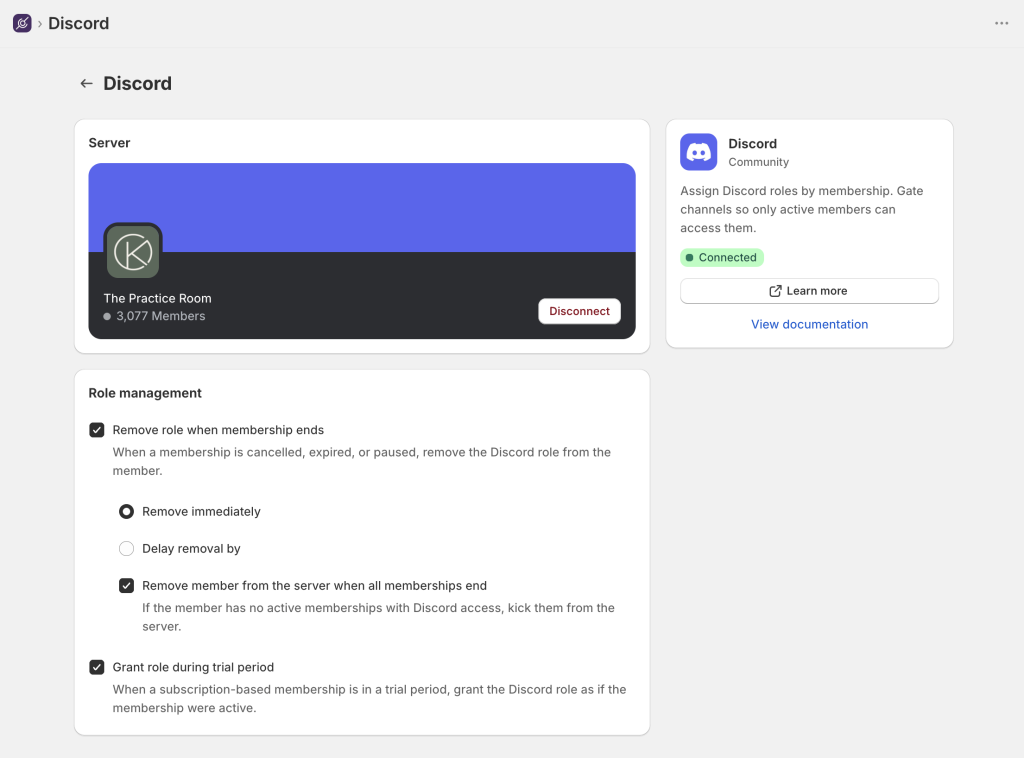
Zendra’s Discord integration does each of these for you: when a membership is active on a plan with Discord access, the member receives the roles you configured. When the membership ends or pauses, the roles come off — with an optional grace period if you’d rather give lapsed members a few days to resubscribe before they lose access.
Upgrades and downgrades resync roles automatically, so a member who moves from Silver to Gold lands in the right channels without a support ticket.
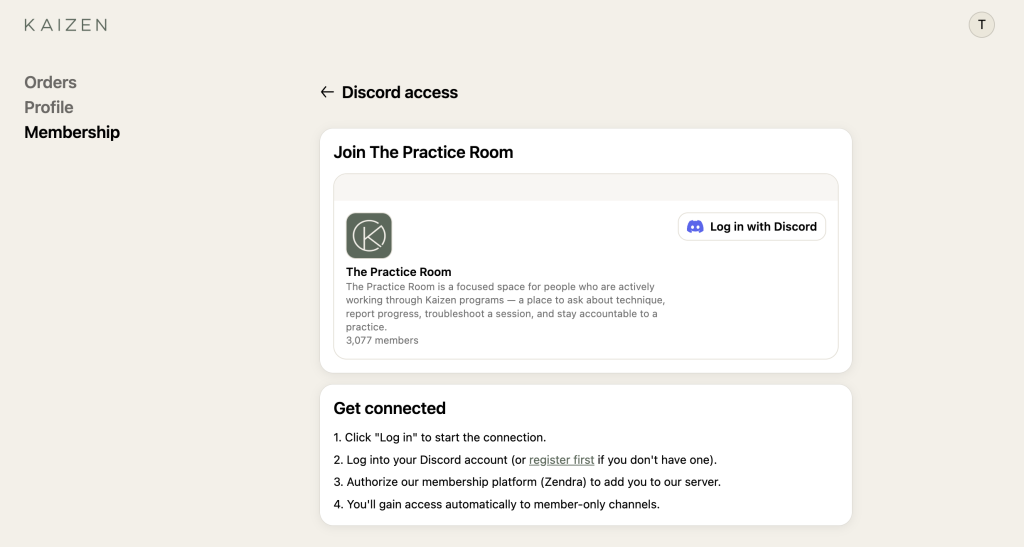
Members connect once, from inside their member portal, with a single “Log in with Discord” step. After that, everything happens in the background.
Discord access is a Growth-plan feature in Zendra. If you’re on a lower tier, it’s the upgrade that turns, “we have a Discord somewhere” into a community that stays accurate on its own, in real time. Once you have more than a handful of members, the Discord integration is difference between a cost center and a growth lever for you, and the difference between a perk and a chore for your members.
Read more about the full setup in our Discord integration docs.
Tiered communities: different access by plan
If you run a tiered membership program, your community can mirror those tiers. (Not there yet? Our guide to launching a membership program covers tiers.)
Each tier grants a different role, and each role opens a different set of channels, such as a general member lounge for everyone, a Gold-only feedback channel, a Platinum room with direct founder access.
Because Zendra resyncs roles on plan changes, the channels a member sees always match what they’re paying for. (Our premium membership with tiers recipe walks through a full tiered setup.)
What to put in the member community
A community drives retention when there’s a reason to come back. Anchor it to things only members get, rather than chat for its own sake. We’ve seen a few patterns that tend to work well for community usage:
- Early access and drops: announce launches to members first, or open member-only purchase windows — which is easy with Zendra members-only access to products.
- Direct line to the brand: ask-me-anything sessions, founder Q&As, or a channel where members shape what you make next.
- Member-only content and resources: guides, behind-the-scenes, or content you also gate on your storefront.
- Recognition: a visible role that marks long-tenured or top-tier members as insiders.
The common thread is that each one rewards attention and membership, not price — which is exactly what keeps the perk valuable over time, and adds value the longer a member remains subscribed.
Starting a Shopify member community
Pick the simplest version of a community that fits your brand. Create one plan, one community, and one role.
Decide whether access to your community is free or paid, connect Discord, and add the access perk. You can add more tiers and channels once members are actually showing up.
If you want a step-by-step guide, our Discord integration docs cover the setup end to end — or you can add Zendra to your store and start with a free plan.



Leave a Reply