

A membership feels like a relationship to the person joining it. To the store, it also has to be something much less romantic: the structured data that represents the membership. This can be a product, a price, a line on an order, and a status that changes over time.
Every membership app decides where those records live. Some of that decision is visible when you set up a plan. But much of it only appears later, when you try to answer what should be an ordinary question: How much membership revenue did we earn last quarter? Which tier sells best? Can our email platform recognize active members? What would we have to rebuild if the program changed?
A data island forms when your store sold the membership, but the purchase can only be interpreted by your membership app. Then you realize you didn’t simply install a specialist tool; you created a private data store that the rest of your infrastructure can’t read.
A membership app should add a system to your store, not create a second store beside it.
Zendra was built to avoid creating a data island — it fully speaks Shopify, and is truly Shopify-native. It’s not an app that just looks like Shopify, it’s built the Shopify way, and interacts with all of the other tools you need to run your business.
What a membership data island looks like
Every app owns some specialist data. A membership tool needs to know when access began, whether the membership is active, which perks apply, and what should happen after a failed payment. Shopify products can’t answer all of that on their own — that’s what a membership app is for.
The problem begins when ordinary commerce data becomes app-only data, too. The symptoms usually arrive one at a time.
- You may find yourself maintaining a membership price inside the app, then recreating it in another tool that needs to know what the customer bought.
- Shopify’s product reports may show the rest of the catalog while membership sales live in a separate dashboard with different definitions.
- An order automation may recognize products and variants but fail to recognize the membership purchase without a custom bridge.
- A three-tier program may look like three unrelated records in one system and a single blended number in another.
- Changing a price or restructuring tiers can mean updating several versions of the same idea and hoping none drift apart.
No single symptom proves that the architecture is wrong. Together, they tell you that your membership app has become the a data silo, hidden from the rest of your store and apps.
A membership has two identities
The cleanest way to avoid this is to separate ideas that sound interchangeable until you try to report on them.
- The thing purchased: the offer, price, product or variant, checkout line, and order revenue.
- The relationship created: the member’s current status, perks, access, renewal state, and lifecycle.
A customer might buy a $120 annual Studio membership. Shopify should record that a particular customer bought the annual Studio variant for $120. Zendra needs to know that the purchase created an active Studio membership, which content and products the member can access, when the relationship renews, and what to do if the payment fails.
Those are connected records, but they are not the same record. The product tells the commerce system what was sold; the membership plan tells the access system what the sale now means.
Keep membership sales legible to Shopify
When a paid membership is sold as a Shopify product, it enters the same commercial vocabulary as everything else in the store: it appears as a line item, so product-aware automations and tools that read Shopify orders can recognize the purchase through standard data.
Reporting becomes more useful, too. Shopify provides sales reports at both the product and product-variant level. If the entire membership program is one product, a product-level report can show its total sales. If each paid tier is a variant, the variant report can separate the tiers without losing the rollup.
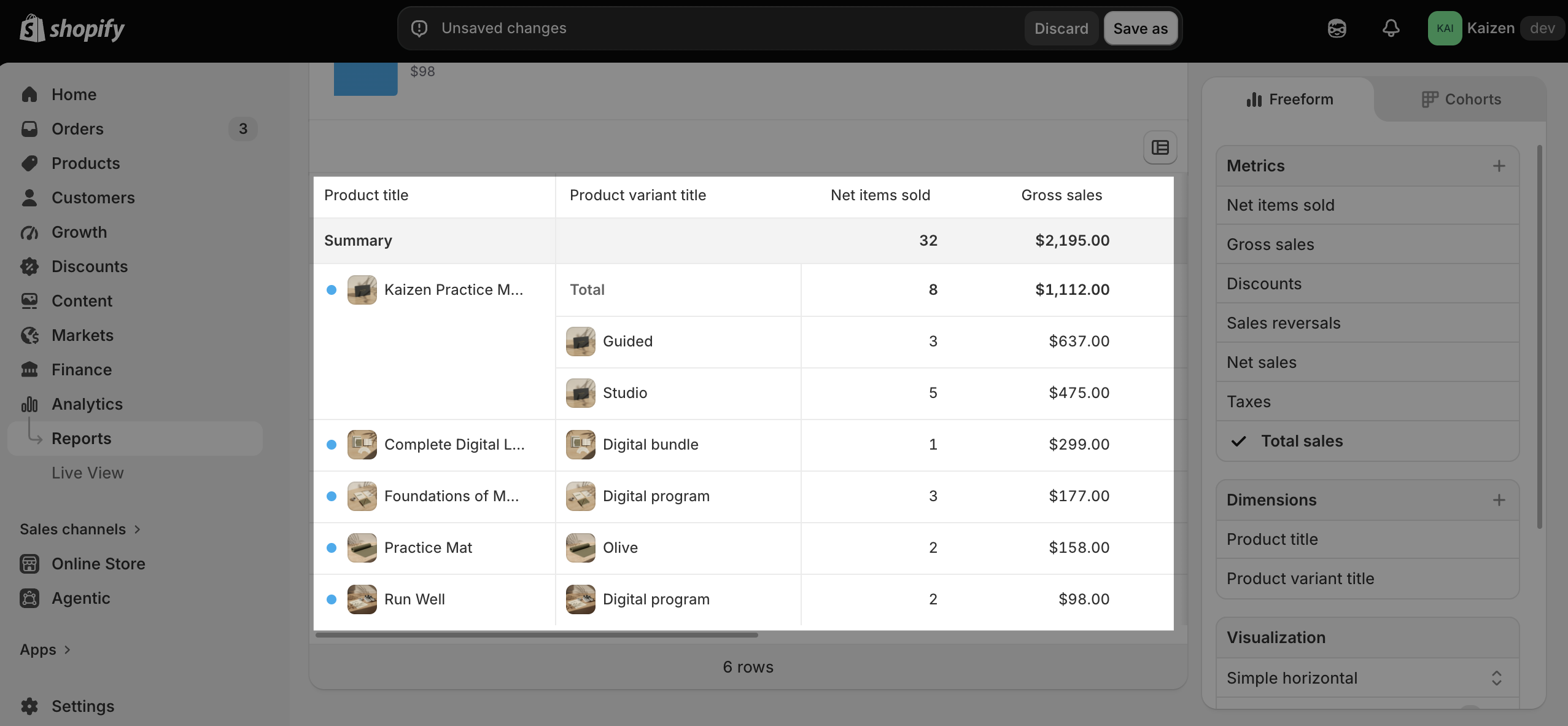
Shopify even has native reports already to illustrate sales by product, which can be used or modified to report on membership and non-membership revenue.
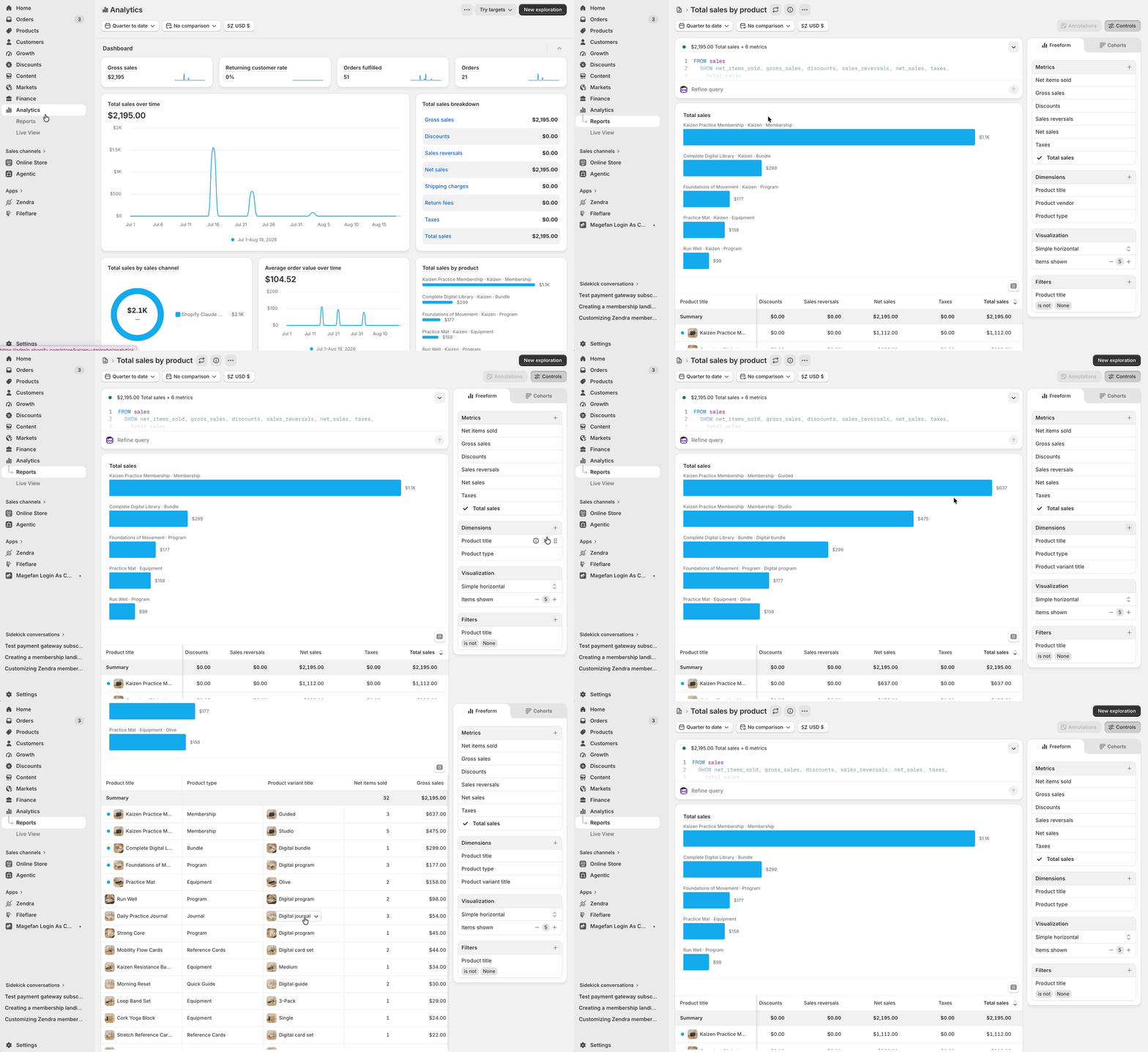
That does not guarantee compatibility with every Shopify app. (A tool still has to read the relevant product, variant, customer, or order data.) The advantage is clear, though: ordinary purchase data remains where Shopify tools already expect to find it.
Use variants to keep tiers together and distinct
Imagine a maker community with three paid levels: Library, Workshop, and Studio. All three belong to one program, but each carries a different price, perks, and promise.
| Shopify record | What it represents | What you can learn |
|---|---|---|
| Membership product | The maker community as a whole | Total program sales |
| Library variant | Resource access | Entry-tier sales |
| Workshop variant | Resources plus group sessions | Mid-tier sales |
| Studio variant | Resources, sessions, and deeper access | Top-tier sales |
One parent product keeps the offer coherent on the storefront and in product-level reporting. A separate variant for each tier preserves the distinction in price and purchase data. Each relevant variant then connects to its own Zendra membership plan, where the perks and access rules live.
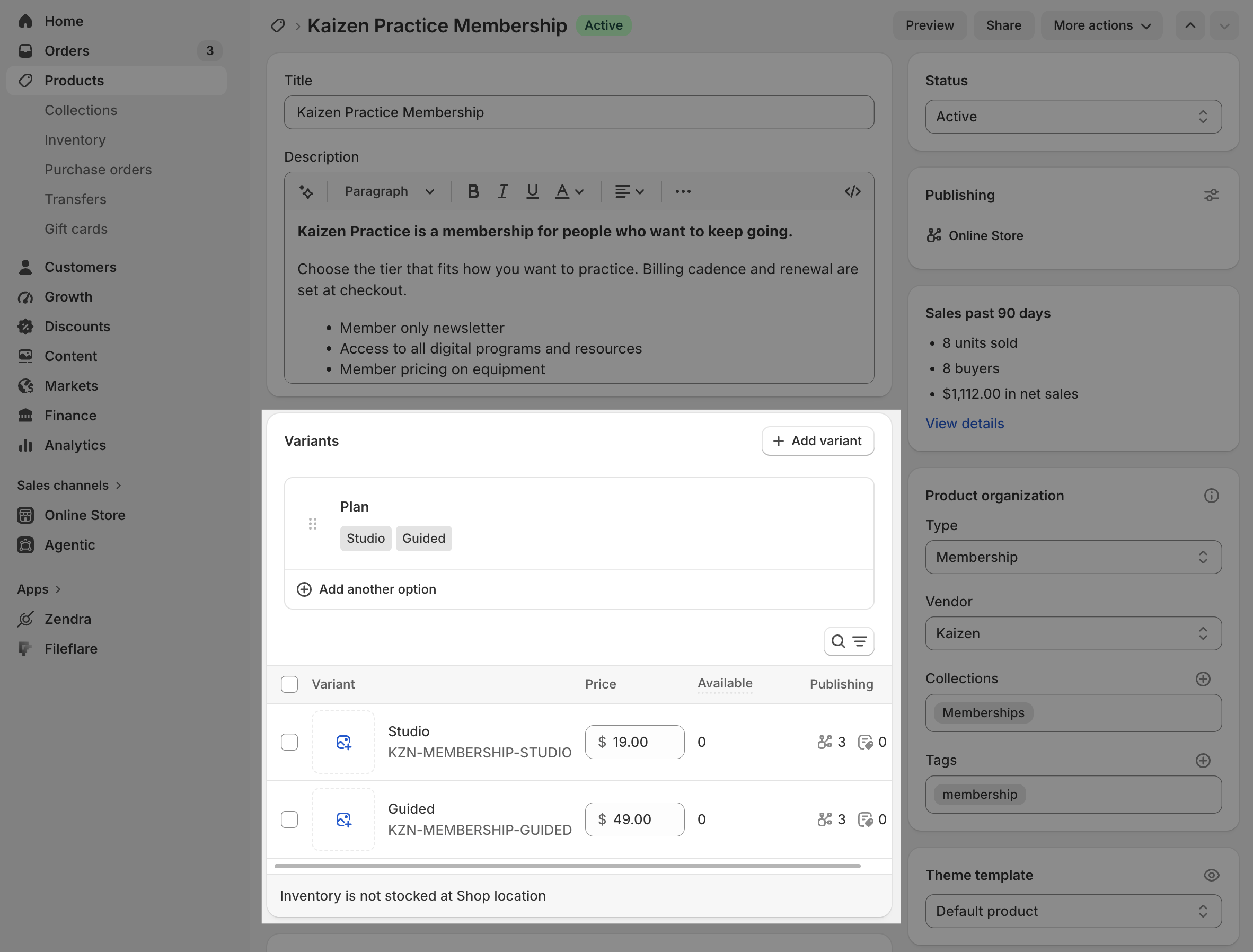

This structure is not mandatory for every program. If the levels are sold to different audiences, require different merchandising, or should never appear together, separate products may be cleaner. The practical question is whether a shopper experiences the levels as versions of one choice or as different offers. Our guide to choosing a membership product structure walks through that decision.
Let selling plans describe how a product is bought
Price and billing cadence create another opportunity for duplicated data. A monthly offer, an annual offer, and a prepaid term can look like three separate prices even when they are three ways to buy the same product.
Shopify’s model separates those concerns. A selling plan represents an alternative way to buy a product or variant, with its own billing and pricing policies. The variant remains the item; the selling plan describes the purchase option.
That distinction is especially useful for subscribe-and-save products. Zendra can inherit a variant’s base price and apply a discount for a weekly, monthly, annual, or custom interval. You do not need to maintain a separate absolute price for every product × variant × interval combination. If the base price changes, the interval’s relative discount can continue to describe the offer for future purchases; existing subscription contracts keep their own terms.
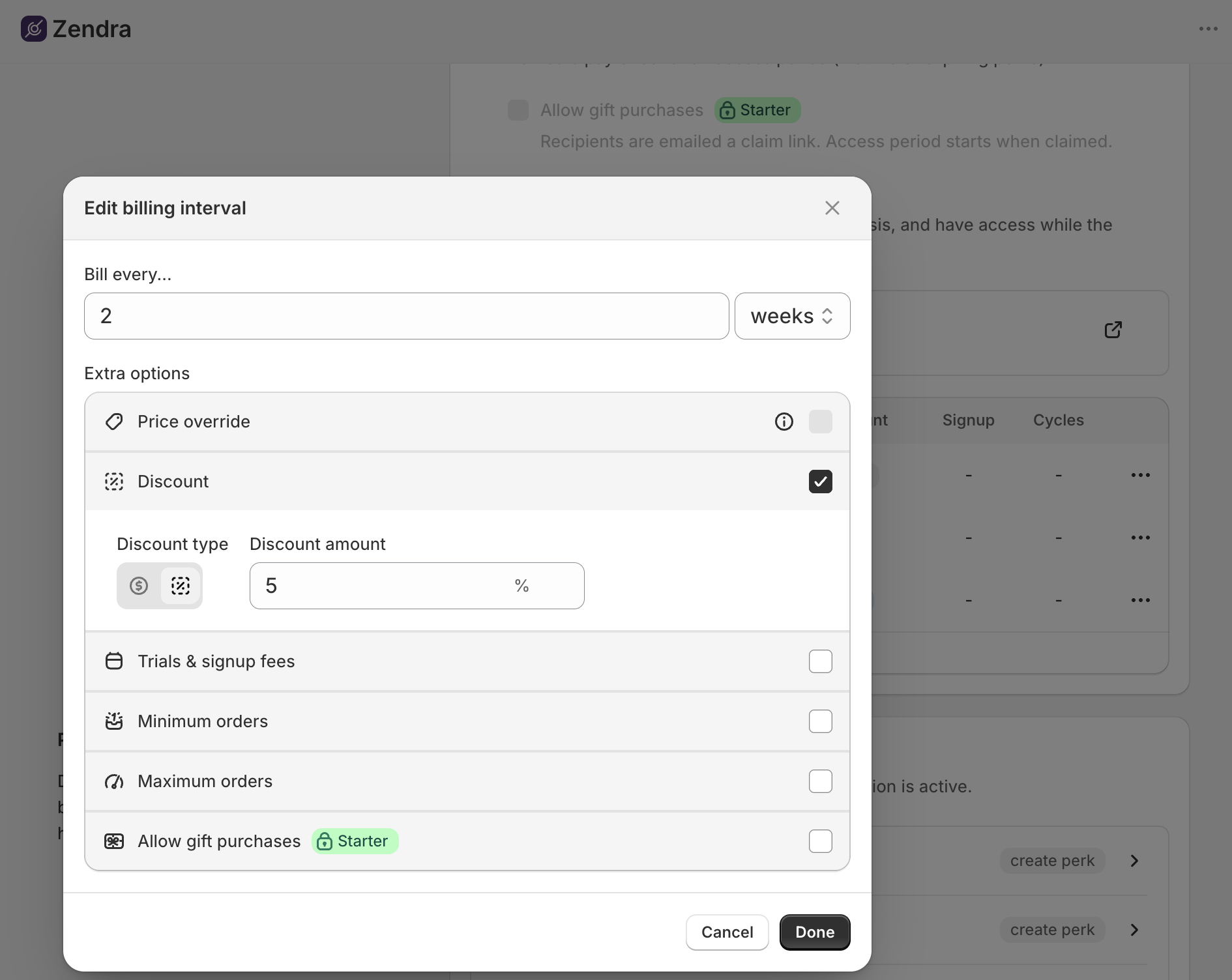
This is also critical for inventory management: Zendra uses your existing products and variants as much as possible so that your inventory can be tracked in one place, regardless of whether customers will get the next shipment in 2 weeks or 1 month.
Membership pricing may still call for explicit choices: a $120 annual plan is not always the same commercial promise as $12 per month. The point is not to force every offer into a formula; it’s to decide which record owns the product data, and which record describes the buying cadence, then keep that decision consistent. Our recurring billing guide covers the available pricing and interval structures.
Shopify-native does not mean everything belongs in a product
Here’s the limit that matters: an order can prove that someone bought a membership, but it can’t prove the membership is active.
The customer may have canceled, reached the end of a fixed term, received a refund, changed plans, or entered a failed-payment state. A product report should not pretend to answer a lifecycle question. This is specialist membership data, and it belongs in the membership system.
The useful question is how that specialist data reaches the rest of the store. Zendra
- maintains Shopify customer segments for active members and for each plan,
- adds customer and order tags,
- exposes membership status through customer metafields,
- and provides membership triggers and actions in Shopify Flow.
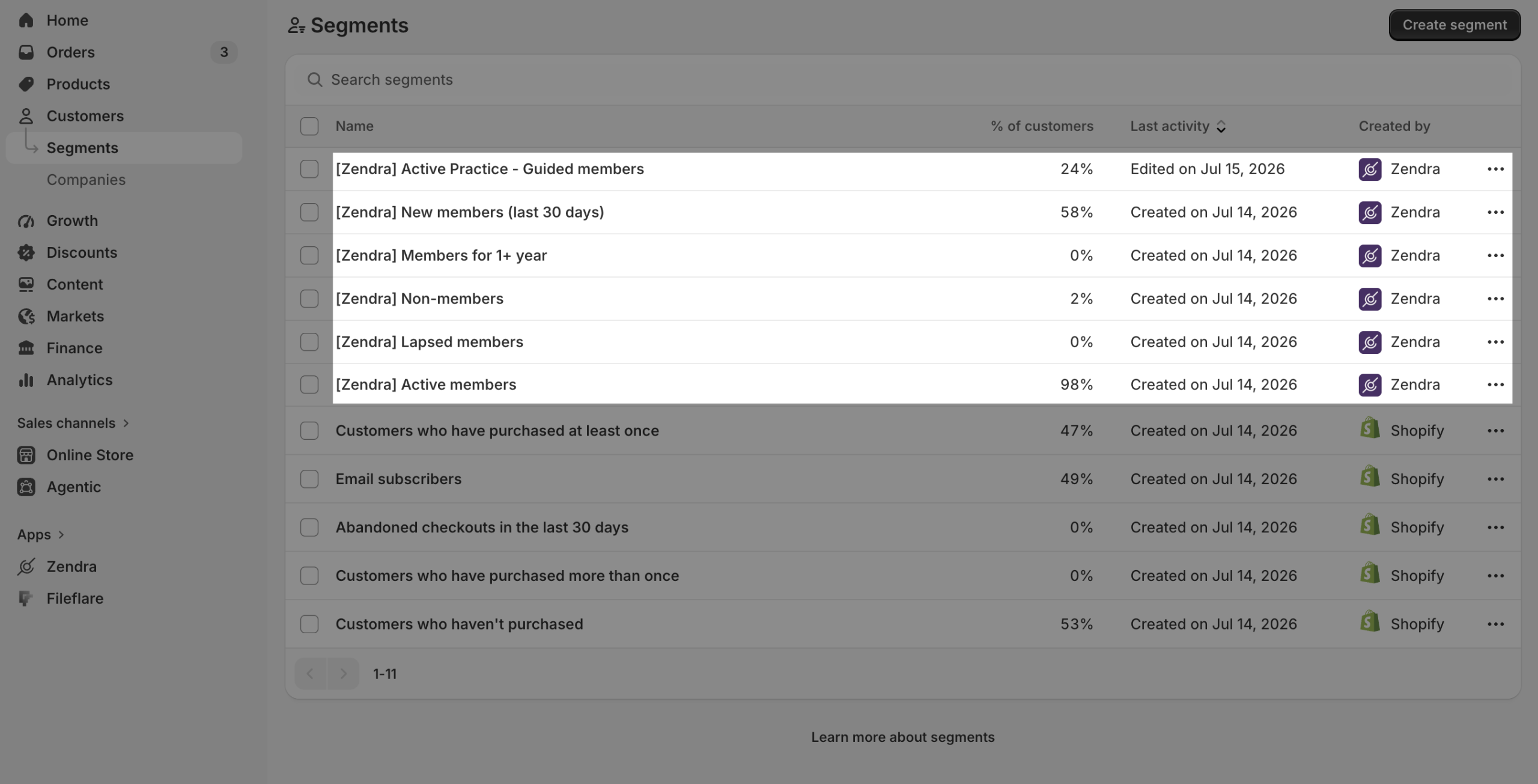
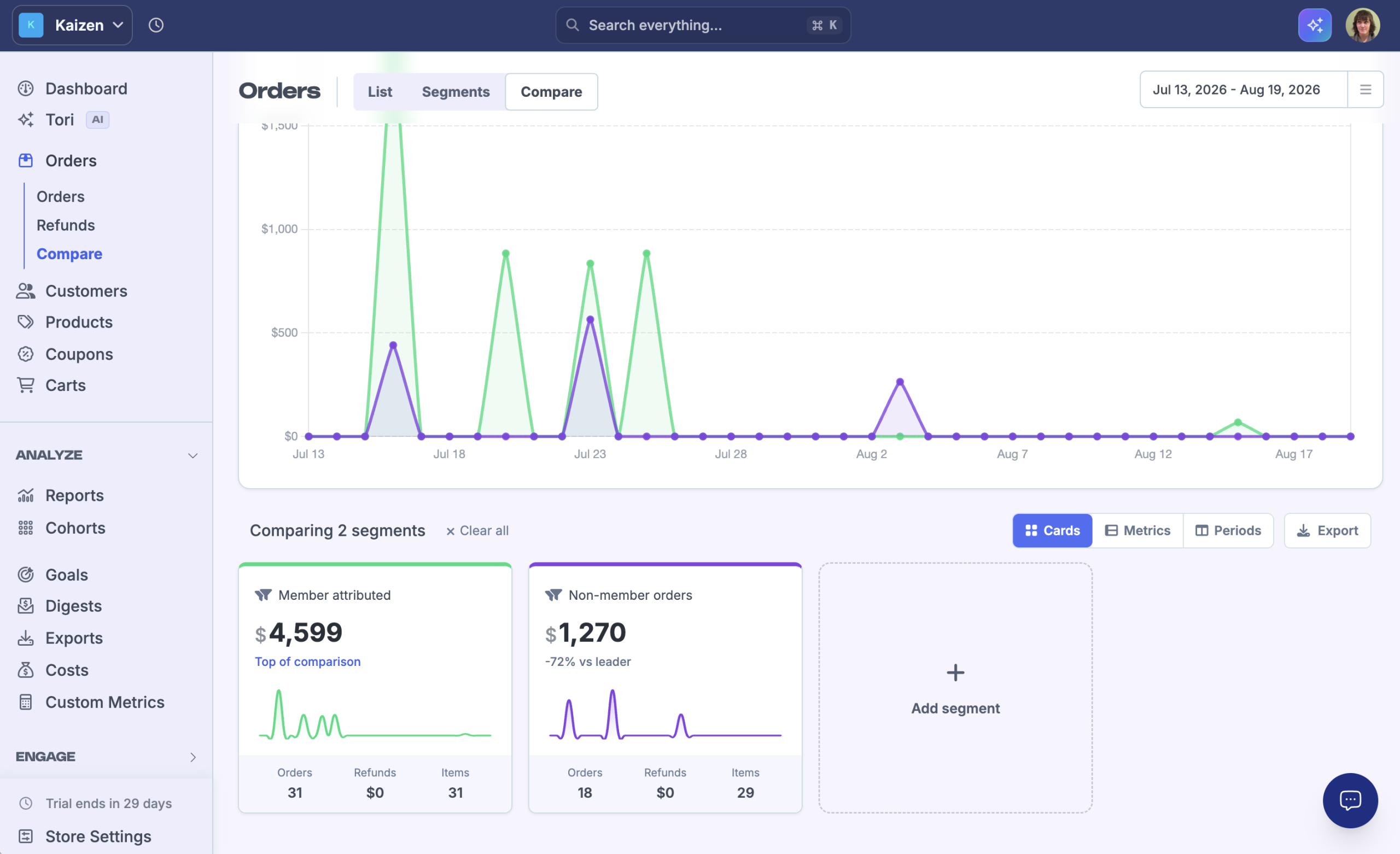
The app remains responsible for the relationship, but other Shopify tools can act on the membership, too. The guide to managing members in Shopify explains where those records appear. For example, since Zendra uses order tags, apps like Metorik can report on member-attributed sales vs non-member sales, without any special integration between the apps.
Ask these questions before choosing a membership app
You don’t need an architecture diagram to evaluate a membership app. Seven questions reveal most of the tradeoffs.
- Is a paid membership sold as a normal Shopify product or variant? Ask what appears on the order and in product reporting after checkout.
- A lot of membership apps create their own sidecar sales system, which will lock you into their reporting, email notifications, and treats your membership revenue as completely separate from your store.
- Where is the base price maintained? If the same price exists in two systems, ask what keeps them synchronized.
- How are billing intervals represented? Find out whether monthly and annual options reuse product data or create a separate price matrix.
- You want an app that uses Shopify selling plans, so that Flows and native reporting work on your subscriptions. Bonus points for apps like Zendra that can inherit your product price, so you only need one plan for subscribe & save products — so the same intervals can easily be re-used across products.
- Can Shopify reports distinguish the program from its tiers? You should know whether the product and variant structure supports both views.
- Which tools can use the purchase without a custom connector? Be specific about the data those tools read; “integrates with Shopify” is too vague to answer the question.
- Since Zendra uses Shopify products, apps like Klaviyo can send a separate welcome series for these purchases, vs regular products.
- How is current membership status exposed? Look for segments, tags, metafields, automation triggers, or documented APIs rather than assuming an order tag stays accurate forever.
- What would you rebuild if the program changed? Consider a new price, a new tier, or a different billing cadence. The answer shows how many copies of the program you are maintaining.
Accept a little more intention at the beginning
A clean product model is not free. You decide whether tiers belong as variants or separate products, and connect each paid offer to the correct Zendra plan.
Our team is always available to help you decide! We see a lot of membership programs, and can give you ideas on the best set up for future success.
Reporting, automations, price changes, and tier redesigns all depend on the structure you chose when the program was small. A little more intention during setup can save months of explaining the same membership differently to every tool around it.
Start with why Zendra treats a membership as a Shopify product, then choose whether your plans belong on one product or several. If you are still deciding what the program itself should offer, our guide to starting a membership program on Shopify owns that earlier decision.
Keep commerce data useful beyond the membership app
A specialist membership app should know things Shopify does not — like member status. The test is whether the app adds that knowledge to your store, or siloes it from the rest of your tools to lock you in.
Products, variants, selling plans, orders, and customer records give Shopify a shared account of the purchase. Membership plans add the living relationship: status, perks, access, and lifecycle. Keep both identities connected, and the program remains legible when you report on it, automate around it, or decide to change it.
That is the architecture Zendra uses. If you want a membership program that fits the store you already run, add Zendra to Shopify and build the first plan on that foundation.




Leave a Reply