

Every group has an entrance ritual. A new employee gets a tour; a new neighbor learns where everyone leaves their shoes; a regular at a café eventually works out that the table by the window belongs, unofficially but immovably, to Jean.
A Shopify membership needs an entrance ritual, too. The purchase or signup changes a customer’s status, but it doesn’t teach them what to do with it. If the next thing they receive is a receipt and a long list of benefits, they’re technically active but still unsure where to begin.
Good Shopify membership onboarding closes that gap. It takes a member from “I’m in,” to, “I know where to go, I used something valuable, and I have a reason to come back.” You can build that path in a week without turning it into a 14-email course on how to be your customer.
Joining changes a customer’s status. Onboarding proves what that new status is worth.
Choose one action that proves the membership works
Before you write the welcome email, choose the first action that means a member reached value. This is your activation action: one observable thing a new member can do in the first few days that fulfills part of the promise they joined for.
- Retail membership: place an order that receives the member discount or free shipping benefit.
- Content membership: open the first protected guide, lesson, or resource.
- Exclusive access program: view or buy a member-only product.
- Community membership: enter the member space or connect a Discord account.
- Subscription-backed membership: find the next charge and know where to manage the subscription.
The action needs to match the reason people joined. Sending a retail member to read your brand story might be pleasant, but it doesn’t prove that their standing discount works. Sending a course member to their billing details proves access exists, not that the material is useful.
The programs that do this well make the first action almost impossible to miss. Costco issues the card at the membership counter, and you show it at the door on your way into the warehouse — joining and first use are the same errand. (We’ve written more about why that membership works the way it does.) Amazon Prime puts the shipping upgrade in the next checkout, inside a flow the customer was already in. Neither one asks the member to go looking for the value. Both arrange for them to run into it.
One action also protects the member from an underrated problem: a generous program can produce a bewildering first visit. Across three experiments, psychologists Sheena Iyengar and Mark Lepper found that a larger set of options drew more interest, but produced fewer decisions. Their choice overload research wasn’t about membership portals, but the design lesson travels well: don’t greet someone at the door with every possible direction. Point to the room they came to use first.
Test the path before a real member takes it
Onboarding begins before anyone joins. A welcome message can’t repair a path that leads to the wrong account page, a benefit that isn’t live, or a portal block that was never added.
Create a test customer and walk through the experience from the member’s side. With Zendra, you can grant that customer a complimentary membership from their Shopify customer page, which lets you test access without placing a real order. Then confirm:
- The membership plan is live. Draft plans don’t affect the storefront.
- The activation email is enabled, uses the correct plan language, and points to a working destination.
- The Zendra member portal block appears in Shopify customer accounts.
- The test member can find the first promised benefit after signing in.
- Discounts, shipping benefits, protected content, or product restrictions behave as the member will expect.
- The support route in the email reaches a person who knows how to resolve access problems.
Zendra’s advanced member portal [Growth+] shows an inventory of all perks to members, letting them browse to easily see the full membership benefit.
Do the test on a phone, too. The first week path often begins in an inbox, not on the carefully arranged desktop version of your store.
Day 0: send the member to one useful destination
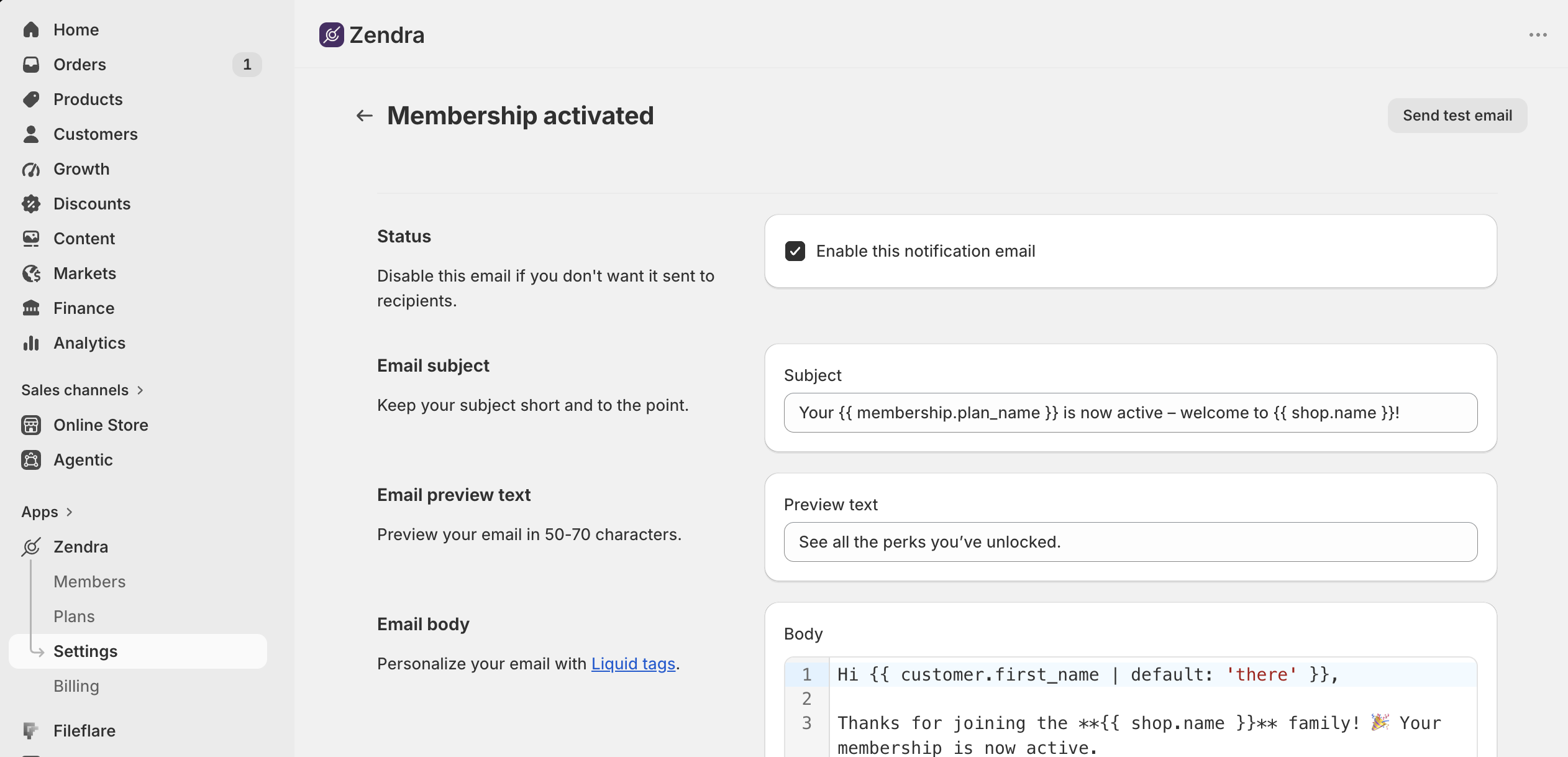
Zendra sends a customizable activation email as soon as a membership starts, once you’ve enabled it. Treat it as the first step of the experience, not a ceremonial welcome mat.
A useful activation email does five jobs:
- Confirm the change: say that the membership is active and name the plan.
- Restate the promise: remind the member what they joined to receive, in one sentence.
- Give one first action: link directly to the benefit or account area you chose as the activation action.
- Set an expectation: tell them what will happen next, especially if another benefit arrives later.
- Offer a human route out of confusion: tell them where to ask for help.
Keep the call to action singular. Shopify’s current guide to onboarding emails recommends giving each message a clear objective and using direct, concise guidance. That advice is especially useful here because the member has already converted; the email’s job isn’t to sell the program again. It’s to help the member begin using it.
In Zendra, you can edit the activation email’s subject, preview text, and Liquid body; use member, plan, membership, and shop variables; choose its send delay; and send yourself a rendered test. The email notification guide covers each control. Read the test on your phone and click the main link before you save it.
Days 1 and 2: make the member portal the way back
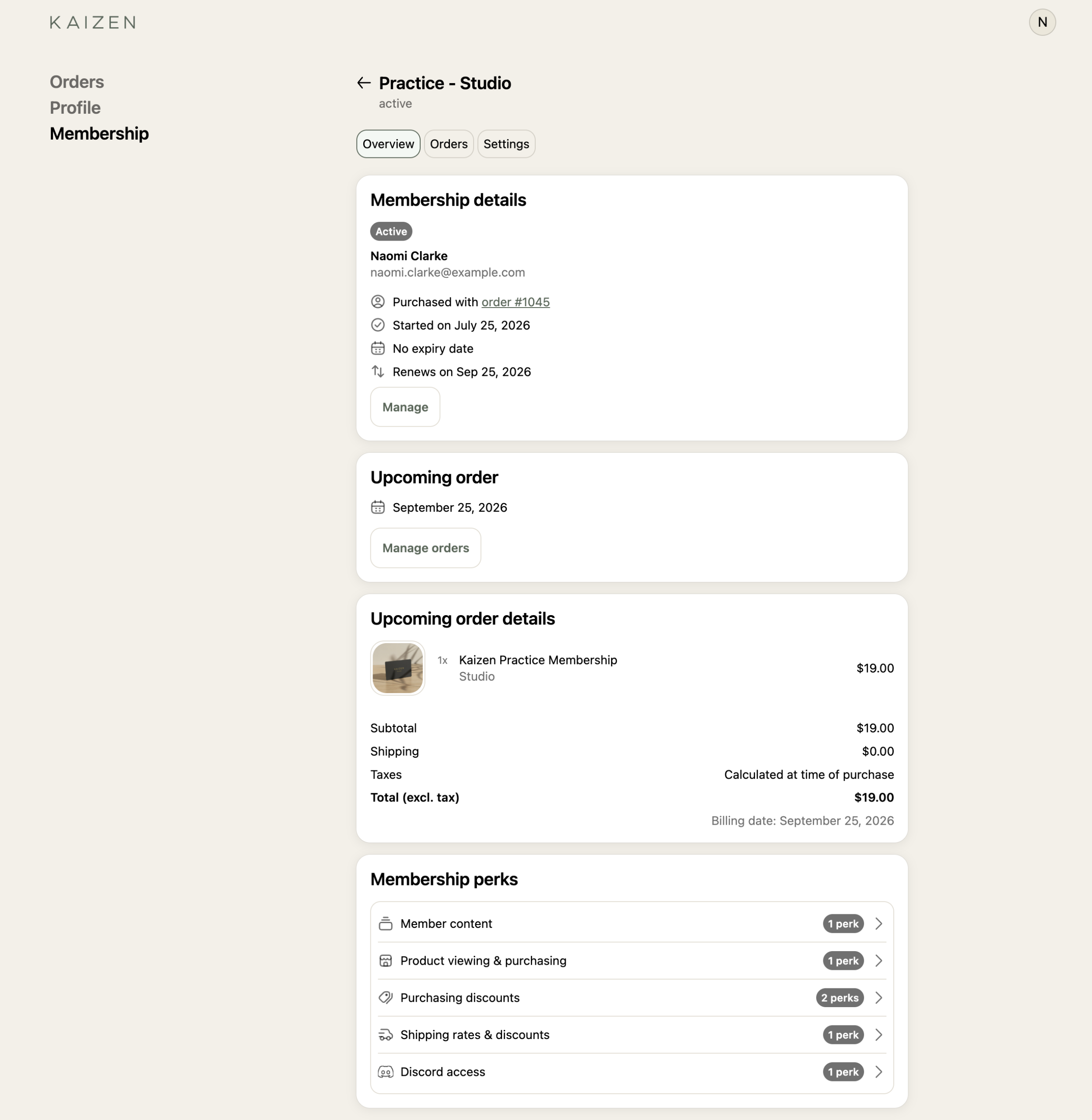
A welcome email is temporary; the member needs a place they can find again without searching their inbox. In Zendra, that place is the member portal inside Shopify customer accounts.
The portal gives members a stable home for membership status, upcoming charges, billing history, addresses, payment methods, and self-service cancellation. On Growth and above, its perks overview also shows the benefits attached to the plan. The member portal guide explains what members see and how to add the account block.
The activation email can link straight to the first benefit, but teach the portal as the route back. “Use this discount today” answers the immediate question; “Find your membership in your account whenever you need it” gives the relationship a durable address.
Days 3 and 4: deliver an immediate first win
The first win doesn’t have to be your most expensive perk. It needs to be easy to reach, clearly reserved for members, and relevant to the reason they joined.
Notice how rarely the best first win is the biggest one. REI’s annual Co-op Member Reward is the benefit members talk about, but it arrives once a year — long after someone has decided whether joining was worth it. Whatever carries day one has to be smaller and nearer than that. Small, immediate, and unmistakably theirs beats large and deferred, because the job of the first win isn’t to justify a year of membership. It’s to prove the thing works.
- For a shopping program: point to a product the member already wants, then let the automatic member discount or shipping benefit make the advantage visible at checkout.
- For an access program: link to one protected resource or exclusive product instead of the full library. If the content is the benefit, the first piece should solve a complete problem on its own.
- For a community: make the first action entering the space, not reading the rules about entering it. Zendra’s Discord integration, available on Growth and above, lets members connect from the portal and receive the role associated with their plan.
- For a subscription-backed membership: show members where to review upcoming charges and update their payment method, then explain what value will recur before the next renewal.
Resist the urge to demonstrate value by listing everything. A 12-item benefit inventory asks the member to design their own onboarding. One carefully chosen action lets them experience the promise before you introduce the rest.
Days 5 to 7: give the member a reason to return
An immediate win answers, “Was joining useful?” The next step answers, “Why should I remember this next week?”
Preview one recurring moment: a member sale, a new protected resource, an exclusive product release, a community event, or the next subscription benefit. The promise needs a date or a cadence attached. “More perks are coming” disappears into the same mental drawer as “We should catch up sometime.” A named rhythm — the first Friday drop, the monthly member hour, the seasonal sale that opens to members two days early — gives people something to wait for, which is a different and more durable feeling than being pleased once.
Zendra gives you two useful ways to time benefits. Perk scheduling uses calendar start and end dates, which works for a member sale or seasonal offer that opens for every eligible member at once. On Growth and above, access dripping releases a benefit relative to each member’s join date, so every member can receive the second step after the same amount of time. The content protection guide shows how delayed access can turn protected resources into a sequence.

Dripping is useful when the sequence improves the experience. It shouldn’t hold back the first thing someone joined to receive. Give enough value on day one to justify the decision, then use the later release to create direction.
Check whether members took the first action
An activation email sent is not the same as a member activated. At the end of the first week, check the action you chose at the beginning.
- For a shopping benefit, look for the qualifying Shopify order.
- For a protected resource, use the smallest reliable visit or completion signal available in the system that serves it.
- For Discord, check whether the member connected and received access.
- For a subscription-backed membership, review billing or access questions and use a short check-in to learn whether the member found the subscription controls.
Zendra keeps membership status and plan segments in Shopify, and its Shopify Flow triggers expose supported lifecycle events for operations. Activity inside an external course, event, or community tool lives in that tool, so use whichever system owns the benefit as the source for that behavior.
A small program can review new members once a week and contact anyone whose first action is missing. Larger programs can use Zendra’s automatically maintained Shopify segments and Shopify Flow triggers to route supported lifecycle events. Broader, behavior-based campaigns belong in your email platform. The handoff between tools should be explicit rather than disguised as one magical automation.
When several members miss the same action, change the path before adding another reminder. The link may be hard to find, the account setup may be confusing, or the promised benefit may not be as self-explanatory as it sounded on the sales page. Onboarding is useful partly because it exposes those gaps while they’re still close to the joining decision.
Put the first week of Shopify membership onboarding on one page
A practical first week can fit on one page:
- Choose one action that proves the member received value.
- Test the full path with a member account before launch.
- Send an activation email that confirms access and points to one destination.
- Teach the Shopify customer account as the place to find and manage the membership.
- Deliver one immediate benefit that matches the reason the member joined.
- Give the member one specific reason to return after the first win.
- Review the activation action after seven days, then repair the path where members stall.
The sequence stays the same even when the perks differ: confirm, orient, deliver, preview, and check. That consistency matters more than building an elaborate welcome campaign you can’t maintain.
Hand onboarding off to retention
Onboarding has a finish line. Once the member knows where to go, has used the first benefit, and has a reason to return, the regular rhythm of the program should take over.
That means the member stops receiving an orientation and starts receiving the membership: useful perks, recognizable rituals, relevant communication, and support when something goes wrong. Our Shopify membership retention guide carries the work forward with activation reviews, disengagement signals, payment recovery, expiry planning, and cohort analysis.
If you’re building the first week path with Zendra, our Shopify memberships app, start with the activation email, member portal, and one benefit a new member can use today.




Leave a Reply