Reprinted from the Zendra Field Journal
Recipe: Founding member pricing · Updated October 21, 2026 · zendra.com/docs/recipe-founding-member-pricing/
Recipe: Founding member pricing
Give your first members a lower rate they keep for as long as they stay, then charge everyone after them your regular price. Uses one membership plan and a Shopify discount code limited to a set number of uses.

Written by Beka Rice
Last updated
On this page
This recipe shows how to give your first members a founding rate, such as $39 a month for the first 100 people, while everyone who joins after them pays your regular $49. It’s the founding-member deal a new gym or coworking space offers its first sign-ups: join early, and the lower price is yours for as long as you stay.
There’s no founders setting inside Zendra, and you don’t need a second plan. You build one membership plan at your regular price, then a Shopify discount code that only the first 100 members can use. It works on every Zendra plan, including Free.
Overview
- Membership type: Paid, with recurring billing
- Billing cadence: Monthly works best (see “Common issues” for annual billing)
- Offer: A fixed amount or percentage off every payment, for a set number of members
- Best for:
- Launching a new membership and rewarding the people who back it first
- Communities and content memberships where early members shape what you build
- Moving an existing audience into a paid membership with a thank-you rate
What members get
- Founders: the founding rate at sign-up and on every renewal, with the same perks as everyone else
- Everyone after: your regular price, once the founding spots are taken
When this model works well
- You want a launch that creates a reason to join now, without a deadline you have to enforce
- Your regular price is where you want the membership to settle long term
- The founding rate still covers what each membership costs you to deliver
When to avoid this model
- Founders should get different perks, not just a lower price. That’s a separate tier (see Recipe: Premium membership with tiers).
- You only want to lower the first payment. Use Recipe: Discounted first month instead.
- Most of your members will choose annual billing (see “Common issues”)
Reference model
| Setting | Example |
|---|---|
| Membership price | $49 per month |
| Founding rate | $39 per month ($10 off every payment) |
| Founding spots | 100 members |
| Everyone after | $49 per month |
You can use any price, discount and number of spots. The steps below use these.
Step 1: Set up one plan at your regular price
Create one membership plan with recurring billing, priced at your regular price, $49 a month. If you haven’t set one up yet, follow Create your first membership plan and turn on subscriptions in the plan’s billing settings.
Founders and everyone after them join the same plan and get the same perks. Only the price they pay differs, and the discount code takes care of that. One plan means one set of perks to manage, and nothing to retire when the founding spots run out.
Step 2: Create the discount code in Shopify
- From your Shopify admin, go to Discounts and click Create discount.
- Choose Amount off products.
- Configure:
- Method: Discount code
- Discount code: FOUNDINGMEMBER (or any code you like)
- Discount value: Fixed amount, 10.00
- Applies to: Specific products, then choose your membership product
- Purchase type: Subscription, or Both
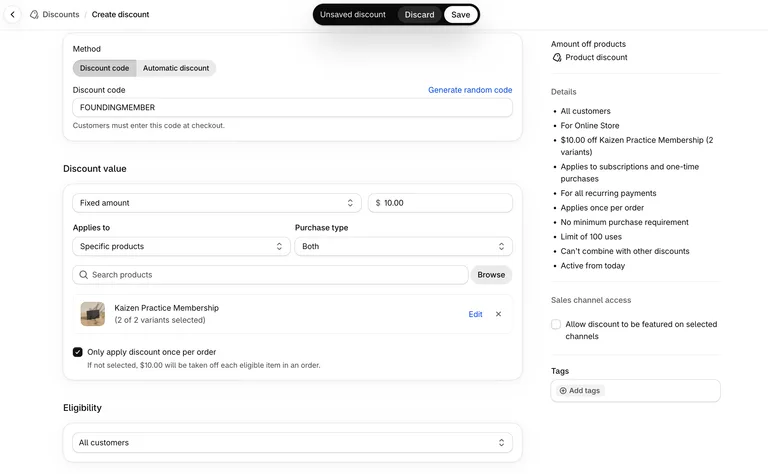
A purchase type that includes Subscription is what lets the code apply to a membership’s recurring billing.
Step 3: Cap the code at your founding spots
Under Maximum discount uses, check both:
- Limit number of times this discount can be used in total, set to 100
- Limit to one use per customer
As Shopify notes under the total limit, a subscription with many payments counts as one use.
Then, under Recurring payments for subscriptions, choose Discount applies to all recurring payments. Shopify selects Limit discount to the first payment by default, so change it here.
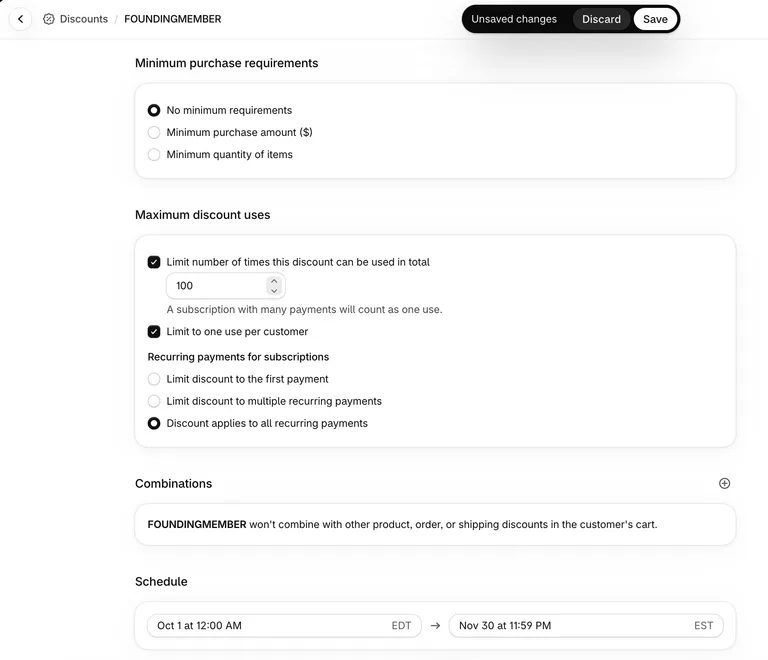
Save the discount.
Step 4: Share the code with your launch
Put the code in your launch email, social posts and anywhere else your early audience will see it. Shopify can also make a shareable link for a discount code, which applies the code when someone opens it, so a founder doesn’t have to type anything.
Say how many founding spots there are. A visible number is what turns the rate from a nice price into a reason to join today.
Step 5: Check it at checkout
Add the membership to your cart, go to checkout and enter the code. The line item shows the founding rate, $39.00, with your regular $49.00 crossed out and the code’s $10.00 off listed under it.
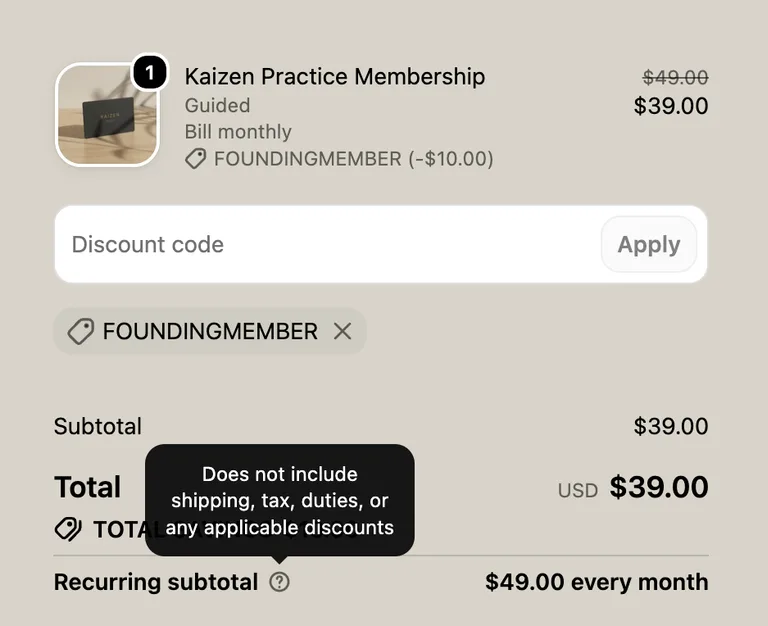
Note: Shopify’s checkout doesn’t show the founding rate in the Recurring subtotal. It shows your regular price, $49.00 every month, even though the code applies to every payment. Shopify’s tooltip on Recurring subtotal explains why: it doesn’t include shipping, tax, duties, or any applicable discounts. Founders are still charged the founding rate, $39 a month plus any tax, on every renewal. So that founders aren’t surprised by the higher number, say so on your product page, for example: “Founding members pay $39 a month for as long as they stay. Checkout lists the regular $49 as the recurring subtotal, but your founding discount applies to every payment.”
How founders keep their rate
When a founder checks out with the code, Shopify saves the code onto their subscription. Every renewal charges the subscription as it was saved, so the founder keeps paying $39 a month without entering the code again.
The code’s usage count goes up once, at sign-up. Renewals don’t count as new uses, so 100 founders use up the 100 spots however long they stay. After that, the code stops working at checkout, and new members pay your regular $49.
That’s also why the founding price is a discount code and not a separate product variant with 100 in stock. Each renewal is a Shopify order, so renewals would use up stock too. The variant would sell out before 100 founders had joined, and founders’ renewals would then fail.
Common variations
- Use a percentage instead. Choose Percentage in step 2, such as 20 percent off, if you might change your regular price later and want founders to keep the same share off.
- Close founding sign-ups on a date as well. Set an end date in the discount’s Active dates, so the founding rate ends at your launch deadline even if spots are left.
- Offer founding spots to a specific list. In the discount’s eligibility settings, choose specific customers or customer segments, such as your newsletter subscribers or past buyers, so only they can use the code.
Common issues
- A founder cancels and wants to come back. A founder who cancels and joins again starts a new subscription at your regular price. The code is limited to one use per customer, so they can’t use it a second time. If you want to welcome one founder back at the founding rate, create a separate discount code limited to that customer.
- Founders who cancel don’t free up a spot. The use is counted when a founder signs up, and cancelling the membership later doesn’t give it back. If you want to reopen spots, raise the total uses on the discount.
- Annual members get the discount once a year. A fixed amount comes off each payment, whatever the billing option, so on an annual option $10 comes off the whole year. To give annual founders the same share off as monthly founders, use a percentage instead.
- Renewals charge the regular price. Check that Recurring payments for subscriptions is set to Discount applies to all recurring payments. Subscriptions that started before you changed this setting keep the discount they were created with.
- Checkout shows your regular price as the recurring subtotal. That’s expected. Shopify’s recurring subtotal leaves out discounts, so founders still pay the founding rate on every renewal (see the note in step 5).
- The code doesn’t work at checkout. Confirm the purchase type is Subscription or Both, not One-time purchase, and that the code applies to your membership product. If all your founding spots are taken, the code no longer applies.
Keep learning
Still stuck? Contact support and we’ll help.